
Product Advertisement: Types, Examples & How to Make One in 2026
A product advertisement is paid, non-personal promotion of one specific product — built to spotlight that product’s features and benefits and move a buyer toward a purchase. It is the opposite of institutional advertising, which promotes the company or brand as a whole rather than any single item.
Product advertising is also one format of paid creative — the one where the product itself is the hero. It sits inside the wider category of AI video ads, where seven formats run across the funnel; this guide goes deep on the product-ad format that hub only names in a row.
This is the complete reference: what a product advertisement is, the classic types of product advertising, the production formats and which AI path renders each, real product ad examples, whether product video ads actually work, what they cost, the disclosure rules — and how to make a product ad with AI from a single product photo.
Table of contents
- What is a product advertisement?
- Product advertising vs brand advertising
- The types of product advertising
- The product-ad formats and their AI production paths
- What is an AI product ad?
- How to make an AI product ad from one product photo
- Do product video ads actually work?
- Why AI gets the product right but the label wrong
- What product ads cost
- Where product ads run and how long they should be
- Is it legal? Disclosure, the FTC, and synthetic performers
- How Playcut keeps one product consistent
- Frequently asked questions
What is a product advertisement?
A product advertisement is the paid, non-personal promotion of one specific product, designed to build awareness of that product and persuade an audience to buy it. Marketing texts split advertising into two families: product advertising, which sells a specific offering, and institutional (or corporate) advertising, which promotes the organization itself (OpenStax, Principles of Marketing).
Four things make an ad a product advertisement. It is paid for by an identified sponsor; it is non-personal, delivered through media rather than a salesperson; it focuses on one product rather than the brand as a whole; and it is persuasive, aimed at a purchase (American Marketing Association).
The everyday version is simpler. A Pepsi spot selling Pepsi is product advertising. An Anheuser-Busch spot about responsible drinking — promoting the company’s values, not a beer — is institutional advertising. Same advertiser families, two different jobs.
That distinction matters for this guide because the AI workflow, the formats, and the disclosure rules below all assume the product is the hero. When the goal shifts to the brand as a whole, the creative playbook changes.
Product advertising vs brand advertising
The fastest way to tell them apart is to ask what the ad is selling. Product advertising sells a specific product and pushes toward a near-term purchase. Brand or institutional advertising sells the company, its values, or its reputation and plays a longer game. Most programs run both, weighted toward product ads at the bottom of the funnel.
| Product advertising | Brand / institutional advertising | |
|---|---|---|
| What it sells | One specific product | The company, its values, or reputation |
| Primary goal | Drive a purchase now | Build long-term affinity and trust |
| Funnel stage | Mid-to-bottom (consideration → conversion) | Top (awareness → preference) |
| Typical CTA | ”Buy,” “Shop,” “Try it" | "Learn more,” brand recall, no hard ask |
| Example | A Pepsi ad selling Pepsi | An Anheuser-Busch responsible-drinking ad |
The line blurs in practice. A cinematic hero film can build the brand and sell the product in the same thirty seconds. The useful question is which job the ad is mainly hired to do, because that decides the format, the platform, and how you’ll measure it.
For this guide, everything from here assumes product advertising — the product is the hero and the goal is a sale. The wider category of paid creative, including TV-style brand commercials made with AI and the other six formats, is mapped in the AI video ads pillar.
The types of product advertising
The classic marketing taxonomy names four types of product advertising, often mapped to where the product sits in its life cycle: pioneering, competitive, comparative, and reminder. Some texts frame the same space by objective instead — OpenStax §14.2 lists informative, persuasive, comparative, and reminder advertising. Either way, each does a different job, and picking the wrong one for a product’s stage wastes the spend.
Pioneering advertising builds primary demand for a brand-new product or category — it explains what the thing is and why it matters, because no one is searching for it yet. Peloton’s early “what is this bike” era is the canonical example.
Competitive advertising differentiates one brand from the field once a category is established. Apple’s “Shot on iPhone” sells the iPhone against every other phone without naming one. The job is preference, not education.
Comparative advertising names a rival head-to-head — “ours versus theirs.” Samsung-versus-iPhone and Wendy’s “fresh, never frozen” are textbook comparative ads. It is legal in the US when truthful and substantiated, and the FTC actively encourages it as useful to consumers.
Reminder advertising keeps a mature, well-known product top-of-mind so buyers reach for it out of habit — think Coca-Cola’s seasonal spots. You will sometimes see a simpler three-type framing (comparative, competitive, innovative); that is the same idea with pioneering relabeled, and it maps onto these four.
The product-ad formats and their AI production paths
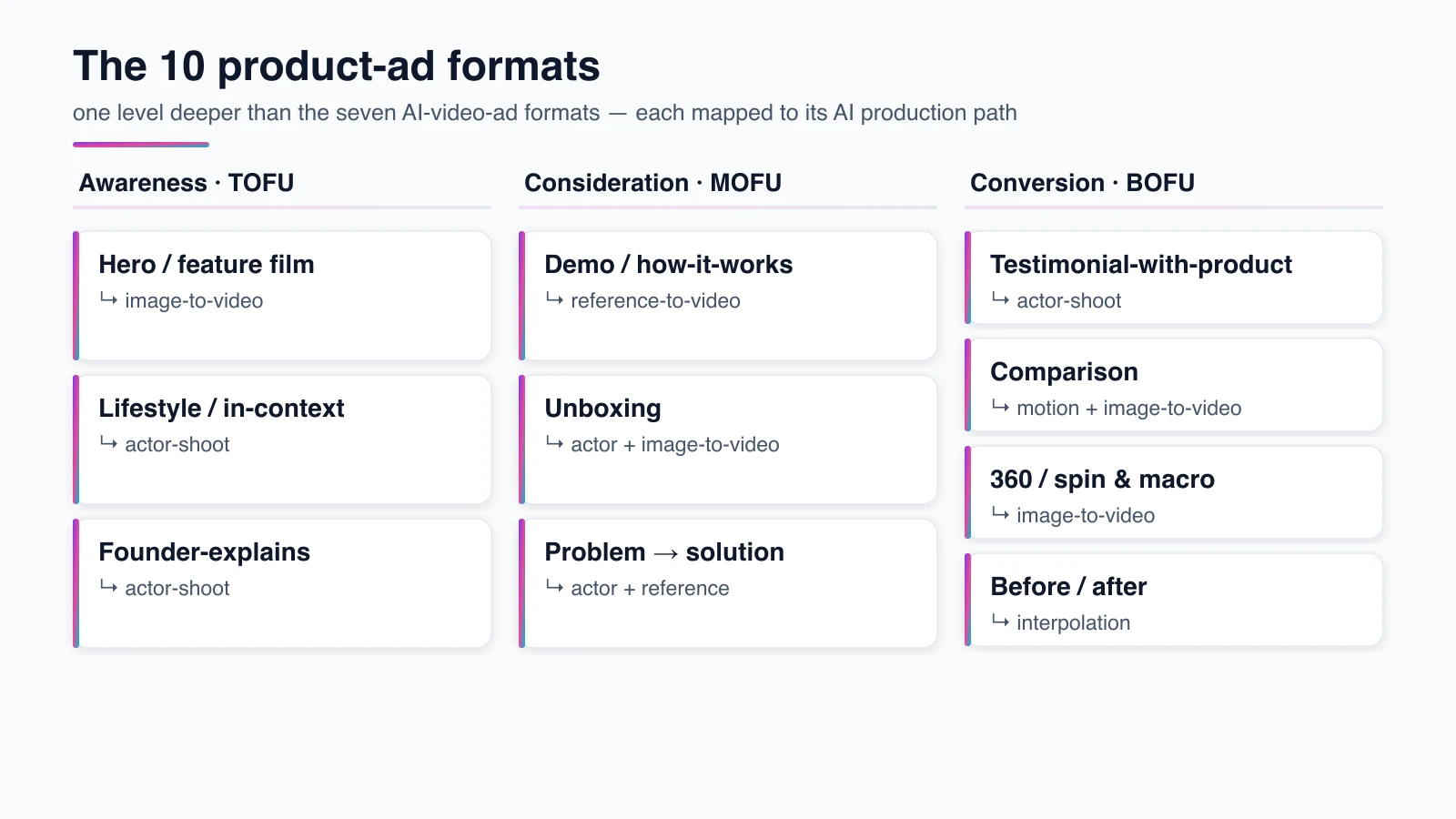
Beneath those four strategic types sit the production formats — the actual shape the ad takes on a feed. This is where a product advertisement gets built, and where AI changes the economics. The parent guide names “product ads” as one of seven AI-video-ad formats; this table goes one level deeper, inside that row, and maps each product-ad format to the AI path that renders it.
| Format | What it’s for | Funnel stage | AI production path |
|---|---|---|---|
| Hero / feature film | The product as protagonist — desire-building | TOFU→MOFU | Image-to-video from a product photo |
| Lifestyle / in-context | The product in a real daily scene | TOFU→MOFU | Actor-shoot (actor holding product) |
| Demo / how-it-works | Show the product functioning | MOFU | Reference-to-video + motion graphics |
| Unboxing | Recreate the first-open moment | MOFU | Actor-shoot (hands + product) + image-to-video |
| Problem → solution | Pain first, product as the fix | TOFU→MOFU | Actor-shoot read → reference-to-video reveal |
| Testimonial-with-product | A customer endorses while using it | MOFU→BOFU | Actor-shoot with a saved consistent actor |
| Comparison | ”Ours vs theirs,” side by side | MOFU→BOFU | Motion graphics + image-to-video of both |
| 360 / spin & macro | Rotate or zoom for close inspection | MOFU→BOFU | Image-to-video (orbit) + motion graphics |
| Before / after | Show a visible result | MOFU→BOFU | Image-to-video / interpolation between stills |
| Founder-explains | The maker tells the “why” | TOFU→MOFU | Actor-shoot (founder) or talking-head |
Two of these formats overlap registers the parent guide already covers — testimonial-with-product and founder-explains lean on a person on camera, so the actor-driven formats and their consistency mechanics are taught there. Here the point is the product-side craft — the formats where the item itself, not a presenter, has to carry the ad.
Match the format to the funnel job. Hero films, lifestyle, and 360 spins buy attention at the top; demos, comparisons, and unboxings close consideration; testimonials and before/afters remove last-mile doubt at the bottom. Running a cinematic hero film as a bottom-funnel retargeting ad is the most common and most expensive mismatch.
A few real ads make the table concrete. Apple’s iPhone homepage hero is the feature-film format, Glossier’s minimalist scenes are lifestyle, Samsung’s side-by-sides are comparison, and a DTC founder’s origin reel is founder-explains. With AI each maps to a path — the hero film animates a product still, the lifestyle scene casts an actor holding the product, and the comparison stacks two image-to-video clips in a split screen.
What makes any of these formats land is the same short list: one clear benefit, a hook in the first few seconds, an honest claim, and a single call to action. The format sets the shape; those fundamentals decide whether it sells. AI lets you test which benefit and which hook win — it doesn’t choose them for you.
What is an AI product ad?
An AI product ad is a product advertisement whose footage is produced or assembled with generative AI instead of a camera crew and a studio shoot. The intent is unchanged — sell one product — but the production method is new: a product photo animated into motion, an AI actor holding the item, an AI voiceover naming the benefit.
The useful framing is that AI is a production tool, not a creative engine. In a peer-reviewed deployment, the marketing team “retained full control over message content, using GenAI as a production tool rather than as a creative engine” (MIT IDE). The strategy, the offer, and the claim still come from a human.
What changed is volume and cost. The same product photo can be re-rendered into a hero film, a lifestyle clip, ten hook variants, and five aspect ratios for the cost of one traditional shot — and adoption has followed. The IAB reports 86% of advertisers expect to use generative AI to build video ads (IAB).
The market context is large. Global ad spend is forecast to pass US$1.04 trillion in 2026, with online video up 11.5% (dentsu). Other forecasters put the total higher, but the direction is the same: more video, more often, which is exactly what AI production makes affordable.
Like any AI ad, a product ad sits on a spectrum. At one end every frame is synthetic — a product photo animated with no camera involved; at the other, a real shoot gets an AI voiceover or AI-localized variants. Most product ads running today land in the middle, mixing a real hero shot with AI-generated supporting surfaces.
How to make an AI product ad from one product photo
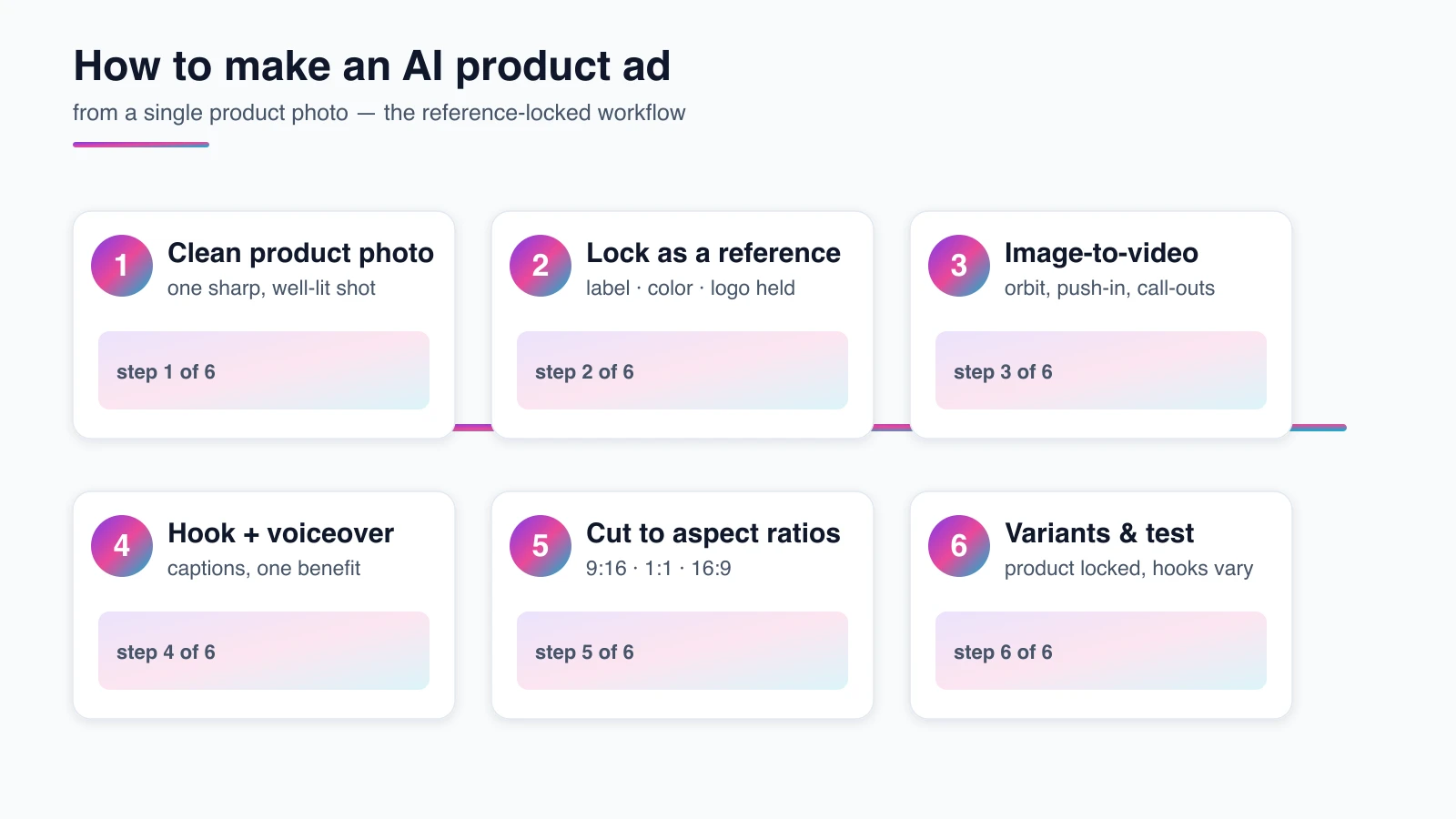
You make an AI product ad in six steps, starting from a single clean product photo: lock the product as a reusable reference, animate it with image-to-video, add a hook and voiceover, cut it to each platform’s aspect ratio, then render consistent variants and test. The method below is tool-agnostic — it teaches the production map, not one app’s buttons.
Step 1: Start with one clean product shot
Everything begins with one high-resolution product photo: clean edges, even light, a white or simple lifestyle background. That first frame conditions every generation downstream, so a sharp hero shot does more for the final ad than any prompt later in the pipeline. If you don’t have one yet, AI product photography is the upstream step that produces it.
The pitfall is starting from a busy, low-resolution, or cluttered photo and expecting the model to clean it up. It won’t — it will amplify the noise. Spend the effort here, because steps two through six all inherit this frame.
Step 2: Lock the product as a reusable reference
Save the product as a reference the model reuses on every shot, so the label, color, proportions, and logo placement hold identical across scenes and variants. This is the product-side analog of keeping an AI actor consistent — and it is the single technique that separates a usable product-ad set from a pile of near-misses.
Google’s Veo, for example, accepts up to three reference images of a single product and “preserves the subject’s appearance in the output video.” Without a locked reference, each new clip re-invents the product slightly, and a campaign of “cousins, not twins” is the result.
Step 3: Animate the photo with image-to-video
Turn the still into motion with image-to-video: an orbit, a slow push-in, a parallax drift, or an exploded feature call-out. The model conditions on your first frame and generates a few seconds of motion around it — which is why a locked, high-quality still matters so much. You can animate the product shot into a clip directly from the reference.
A short product clip outperforms a static frame for purchase intent; one peer-reviewed study found product videos that show the item in use beat appearance-only shots on intent (M=5.43 vs 4.49) (Cheng et al., 2022). Keep clips to a few seconds — quality degrades as generated video gets longer.
Step 4: Add the hook, voiceover, and captions
Layer a two-to-three-second hook on the front, an optional AI voiceover naming one core benefit, and burned-in captions for sound-off feeds. Front-load the single benefit, because most product ads are won or lost in the first three seconds before a viewer scrolls.
Resist the urge to list every feature. One product, one benefit, one call to action outperforms a spec sheet read aloud. The hook is the highest-leverage edit you’ll make.
Step 5: Cut to platform aspect ratios
Export the spot in each placement’s aspect ratio — 9:16 for TikTok and Reels, 1:1 or 4:5 for feed, 16:9 for YouTube — without a re-shoot. Because the product is locked as a reference, the same conditioned clip re-frames for every channel instead of needing a fresh generation each time.
This is where AI’s economics show up. A traditional shoot bills again for every new cut-down; a reference-locked workflow re-renders aspect ratios for the cost of a few credits.
Step 6: Render consistent variants and test
Re-render the same product across new backgrounds, hooks, and benefit angles — product locked — and let the ad platform’s algorithm find the winner. Cheap variant breadth is AI’s real product-ad edge: ten distinct concepts tested for what one used to cost. Start free with the creator tools and scale the winners.
The discipline is to change one variable per variant so you learn something, not just flood the feed. Lock the product, vary the hook or the scene, and read the results.
Do product video ads actually work?
Yes — product video ads lift purchase behavior, but the honest read is “it depends on relevance,” and the most-quoted numbers are the least reliable. Start with the strongest evidence and work down the quality ladder, because this is exactly where AI Overviews and buyers get misled.
The rigorous result comes from a peer-reviewed field experiment with over 21,000 consumers: AI-personalized video ads lifted click-through by roughly 6 to 9 percent over personalized image ads and generic video (Kapoor & Kumar, Marketing Science). That is a controlled effect with a real sample, not a vendor stat.
A second rigorous signal comes from one specific format. A peer-reviewed study of 705 social-media users found the parasocial bond viewers form with an unboxer significantly drives purchase intent (p < .001) (NMIMS Management Review). Format matters as much as medium — some product ads convert because of how they’re watched, not just that they move.
On the retail side, Amazon reports product detail pages with shoppable video saw an average 23.8% sales lift versus pages without — rising to +32.7% for toys and +30.5% for apparel (Amazon). Treat this as vendor-reported internal 2024 data, not a peer-reviewed study; the deeper Amazon-specific tactics live in our Amazon product video guide.
Now the honest counter-case. The folklore that “video lifts conversions 80%” does not survive scrutiny: Unbounce analyzed roughly 35,000 landing pages and found pages with video converted no better on average than those without (Unbounce). Video helps when it’s relevant and well-made, and does nothing when it’s bolted on.
Survey sentiment rounds it out, with a caveat. Wyzowl’s 2026 survey found 85% of people say a video convinced them to buy and 63% prefer a short video when researching a product — but that is a self-reported survey of only 266 respondents, so read it as sentiment, not causation. The pattern across all of it: product video works when it earns the view.
Why AI gets the product right but the label wrong
The hard part of an AI product ad is not making it look good — it’s keeping the product exactly itself. AI reliably nails a product’s 3D form, material, and lighting, then renders the label text as plausible gibberish. This is a documented, unsolved problem, and being honest about it is what separates a usable workflow from a demo reel.
The most quotable evidence comes from Google’s own research. In a study of product image recontextualization, even Google’s purpose-built, improved pipeline passed a strict human-fidelity review on only 17.4% of individual images and 45.5% of products — and the naive “just regenerate the product into a scene” baseline passed just 10% and 24% (Malhi et al., arXiv:2503.08729). Unattended AI product placement fails a brand-approval bar more often than it passes.
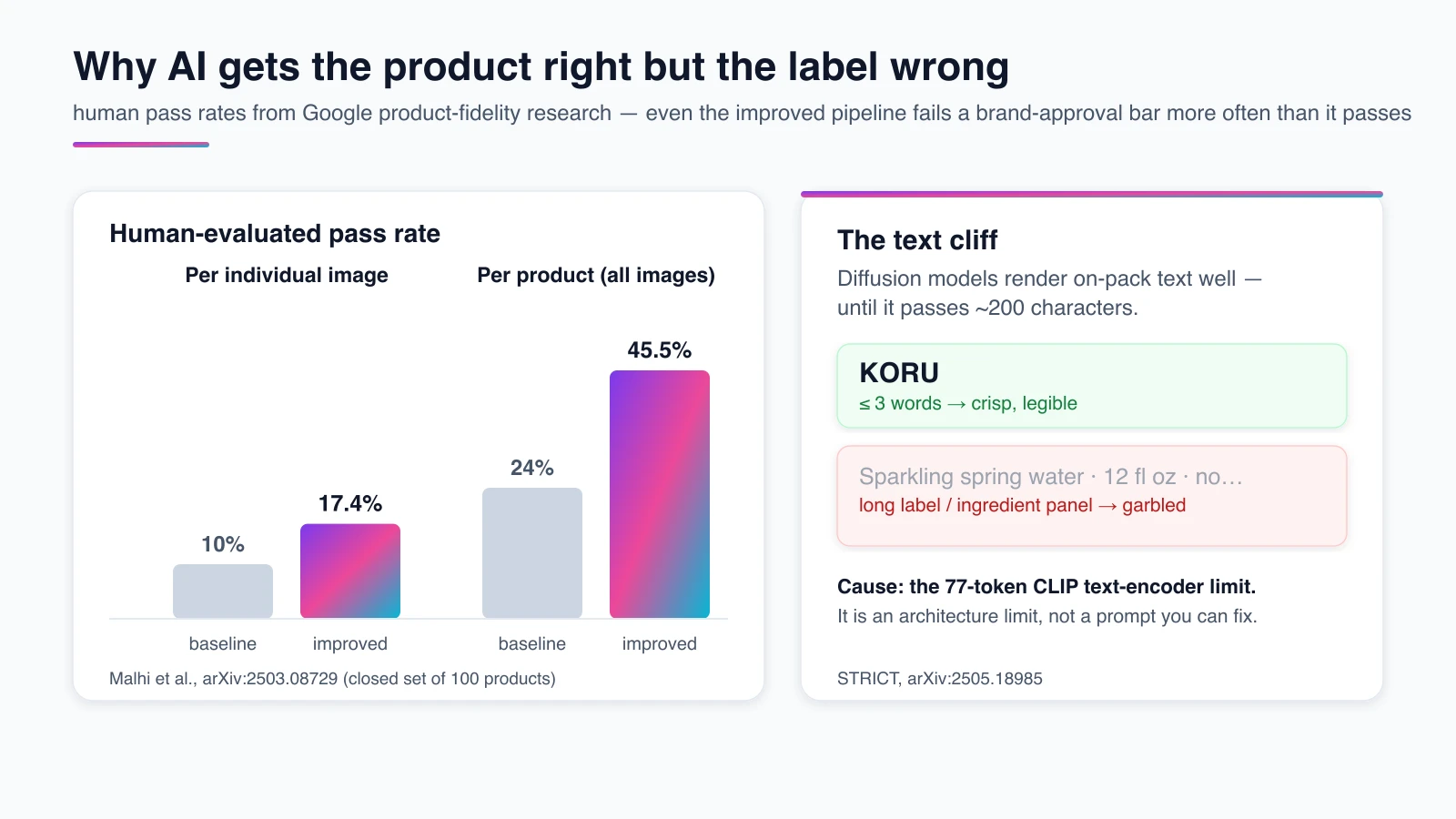
The label problem has a named mechanism. A separate stress test found diffusion models degrade sharply once rendered text passes roughly 200 characters, tied to the 77-token limit of the CLIP text encoder (STRICT, arXiv:2505.18985). An ingredient panel, a legal disclaimer, or a long tagline baked onto packaging is exactly the content that breaks — it’s an architecture limit, not a prompt you can fix.
Here is what that looks like in practice, from running these generations. First: the bottle is perfect and the label is gibberish. The model gets the form and color right, then invents nonsense copy on the pack — so never let it generate fidelity-critical label text; composite real label art onto a clean generated form, or keep on-pack text to a few large words.
Second: the similarity score lies. Automatic metrics like CLIP and DINO read 0.9-plus even on outputs a brand manager would reject, because they capture “it’s a red can of that shape” while missing a subtly wrong logo. A human pass/fail on logo, text, and hallucinated parts is the only honest acceptance test. Third: reflective surfaces and new scenes are where the model hallucinates extra parts — an invented button, a phantom cap, a warped reflection.
The fix is not a better prompt; it’s a locked, reusable reference. Google itself now markets object consistency as a headline feature — Veo 3.1’s “Ingredients to Video” is built to “maintain the integrity of … the objects” across scenes (Google).
Reference-locking doesn’t make product fidelity perfect (the science says nobody’s is), but it moves the hit rate materially — the whole reason a product-ad workflow should reuse one saved product instead of re-prompting every clip.
What product ads cost
Product ad production spans a wide range, and AI compresses the bottom of it. In 2026, plan on roughly $1,000–$5,000 for a simple social product ad, $2,000–$12,000 for an explainer or demo, and $10,000–$50,000+ for a full campaign; AI-native production runs about $0–$7,000. These are directional vendor ranges, not a quote.
| Production type | Typical 2026 cost | Notes |
|---|---|---|
| Simple social product ad | $1,000–$5,000 | Single format, short, one round |
| Explainer / demo video | $2,000–$12,000 | Scripting, motion graphics, voiceover |
| Full product campaign | $10,000–$50,000+ | Multi-format, talent, post |
| AI-native production | $0–$7,000 | Subscription + credits; scales by volume |
A worked example makes the gap concrete. A traditional 30-second product spot for one SKU might run a $3,500 studio day, a $1,200 editor, and $600 in licensing — roughly $5,300 for one finished cut, before any new aspect ratios.
The AI-native version starts from one product photo, generates the hero clip plus four supporting surfaces, and re-frames each for every placement — landing in the low hundreds of dollars in credits, with the variants nearly free. The catch, again, is fidelity: budget a human QA pass on the label and logo, which a studio shoot gets for free.
One distinction matters here: these are production costs, not media spend. The dollars behind running the ad on Meta or TikTok dwarf what it costs to make, and AI doesn’t change that side of the ledger. What AI changes is the cost of having more shots on goal — testing ten product cuts for what one studio shoot used to cost.
The fidelity caveat from the section above still applies. AI doesn’t yet replace the hero studio shot for a fidelity-critical SKU, but it collapses the cost of the four supporting surfaces — lifestyle, macro, motion, and variant cut-downs — that used to need a second shoot day.
Where product ads run and how long they should be
Product ads run wherever a product can be shown and bought: Google Shopping and Performance Max, Meta (feed, Reels, Advantage+), TikTok and TikTok Shop, Amazon retail media, YouTube, and Pinterest. Each placement wants a slightly different cut, which is why the variant step above matters more than any single hero edit.
On length, shorter usually wins. TikTok in-feed product ads land best around 9 to 15 seconds; Reels tolerate 15 to 30 before watch-through drops; YouTube wants the hook before the skip button. The universal rule is a hook in the first 2 to 3 seconds — that’s where most of an ad’s value is delivered, regardless of platform.
The platform-specific specs — exact aspect ratios, feed requirements, and ad-format rules — are deep enough to be their own pages, and they shift often. For the per-platform tactics, the AI video ads guide maps placements across formats, and the Shopify product video guide covers the on-store PDP case.
Is it legal? Disclosure, the FTC, and synthetic performers
Product advertising is legal, but it can’t deceive — and AI product ads increasingly have to be disclosed. The rules that bite hardest for product ads are about claims and endorsements, not the technology itself. A synthetic presenter is allowed; a fabricated “real customer” making an unsubstantiated claim is not.
The FTC’s Endorsement Guides (16 CFR Part 255) require advertisers to substantiate claims made through an endorsement to the same standard as claims made directly. A separate FTC rule, in effect since October 21, 2024, bans fake and AI-generated reviews, with penalties up to $53,088 per violation — the 2025 inflation-adjusted figure, up from $51,744 at the August 2024 announcement (16 CFR Part 465).
Before/after and “results” claims carry the highest risk, because they imply a typical outcome you must be able to prove.
Disclosure law is arriving fast. New York’s synthetic-performer law (A8887-B) requires ads using a “synthetic performer” to disclose it from June 9, 2026, with penalties of $1,000 for a first violation and $5,000 for each later one (NY A8887-B). In the EU, the AI Act’s Article 50 requires AI-generated video to be disclosed from 2 August 2026 — the cross-format detail lives in the AI video ads guide.
The practical takeaway for product ads: build presenters from a fully synthetic or consented likeness, never fabricate a “customer” experience you can’t substantiate, keep on-pack and comparative claims truthful, and use each platform’s AI-content label. Honest disclosure is also good business — consumers penalize the deception, not the AI.
How Playcut keeps one product consistent
The recurring failure in this guide — the product drifting between shots — is exactly what Playcut is built to prevent. You choose the model for each generation (Veo 3.1 or Seedance 2.0 for video, Nano Banana Pro for stills) while the studio holds one saved product reference across every surface, so the label, color, and proportions stay locked from the hero film to the macro cut.
For the human-led formats — testimonial, lifestyle, unboxing, founder — the same idea applies to people. A saved AI actor holds one identity across every variant, so the “creator” stays recognizable and retargeting doesn’t break. Pair a locked actor with a locked product and a full campaign holds together across the funnel.
The workflow is the six steps above. Start from a clean product photo with reference-to-image generation that locks the product, animate it into a clip, and re-render the variants — or spin up UGC-style product reads with the AI UGC ad generator. The AI product ads generator covers the same pipeline with per-platform format specs. Try it free with the creator tools.
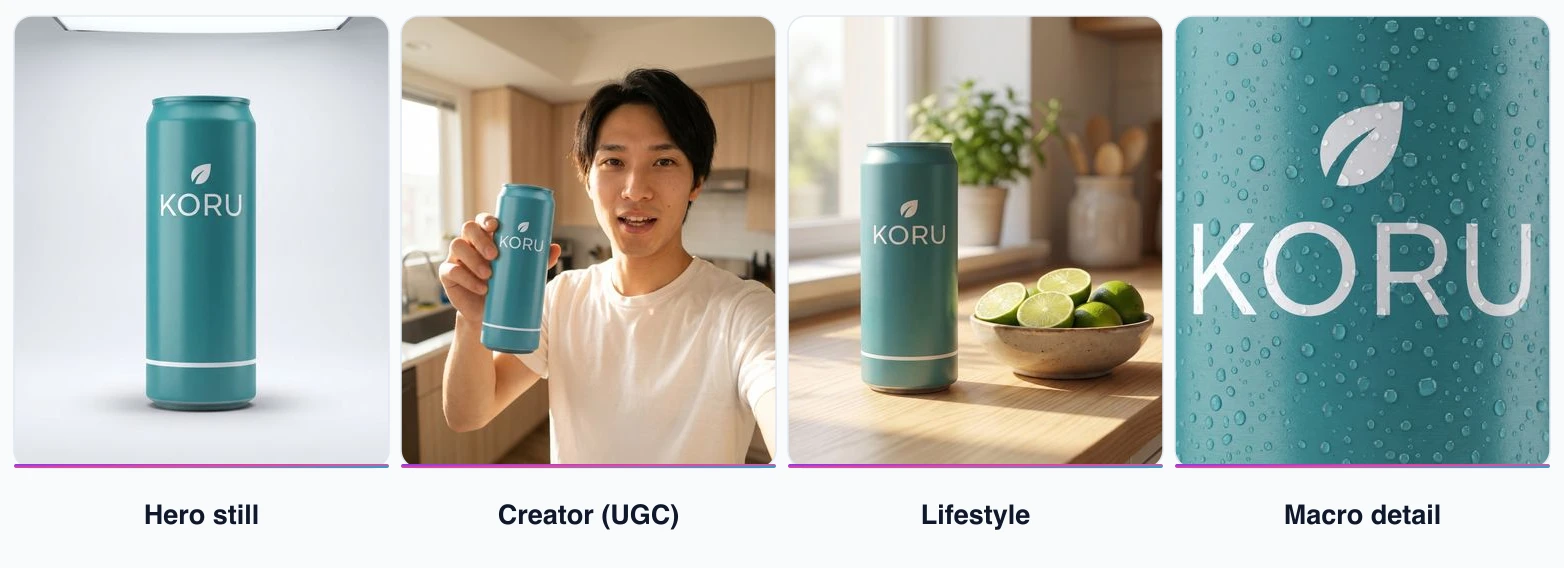
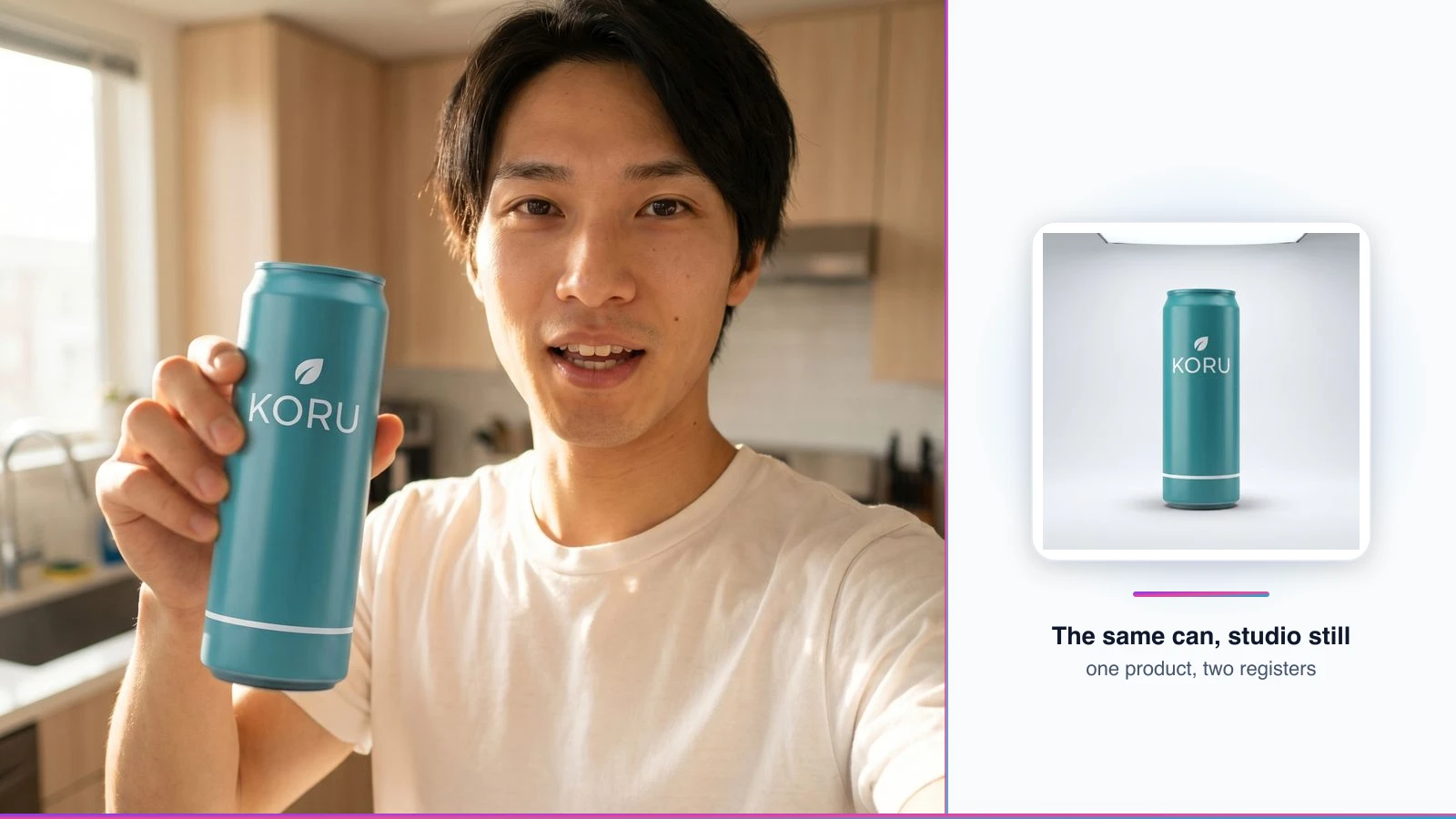
How we made this: one saved product reference plus one saved Playcut actor (Kai), rendered as four ad surfaces by one operator in June 2026. It’s a demonstration of reference-locking on our own samples, not an independent fidelity benchmark — the published research above is the honest read on how hard product fidelity remains.
Frequently asked questions
What is a product advertisement?
A product advertisement is paid, non-personal promotion of one specific product — spotlighting its features and benefits to drive a purchase — as opposed to institutional advertising, which promotes the company or brand as a whole.
What is the difference between a product advertisement and an AI video ad?
A product advertisement is one format — the one where a specific product is the hero, built to sell that item. An AI video ad is any ad in video form made with generative AI, spanning seven formats. So a product ad can be a video, an image, or a static placement, and most video ads aren’t product ads.
What are the types of product advertising?
The four classic types map to the product life cycle: pioneering builds demand for a new product, competitive differentiates a brand, comparative names a rival head-to-head, and reminder keeps a mature product top-of-mind.
How do you make a product ad with AI?
Start from one clean product photo, lock it as a reference for consistency, animate it with image-to-video, add a hook plus voiceover and captions, then export per-platform aspect ratios. No photoshoot is required.
Do product video ads actually increase sales?
The strongest evidence is a peer-reviewed field experiment with over 21,000 consumers: AI-personalized video ads lifted click-through by roughly 6 to 9 percent over image and generic-video baselines. Amazon reports a 23.8% average product-page sales lift with video, from its own 2024 data. Effects depend on relevance.
How long should a product video ad be?
About 9 to 15 seconds is the sweet spot for TikTok in-feed, and 15 to 30 seconds for Reels before watch-through drops. What matters most is a hook in the first 2 to 3 seconds, not the total length.
How much does a product ad cost to make?
In 2026, roughly $1,000 to $5,000 for a simple social ad, $2,000 to $12,000 for an explainer or demo, and $10,000 to $50,000-plus for a full campaign. AI-native production can run $0 to $7,000. These are directional vendor ranges.
Do I have to disclose that a product ad is AI-generated?
Increasingly, yes. In New York, ads using a synthetic performer must disclose it from June 9, 2026. The FTC also bans fake AI-generated reviews and undisclosed paid endorsements nationwide. A synthetic actor is allowed; a fabricated ‘real customer’ is not.
Conclusion: making your first product ad
A product advertisement has one job — make a specific product the hero and move a buyer toward a purchase — and the four classic types, the production formats, and the disclosure rules all serve that job. What AI changes is the cost of trying: one clean product photo, locked as a reference, becomes a hero film, a lifestyle clip, and ten tested variants for the price of a single shoot.
The real constraints still hold. AI gets product form right and product text wrong, similarity scores lie, and product fidelity is materially better with reference-locking but not solved. Build with that in mind — composite real label art, keep a human in the QA loop, disclose the synthetic parts — and the economics tilt hard in your favor.
When you’re ready to build one, start from a clean shot with the image generator, animate it with the video generator, keep your cast consistent with AI actors, and try the whole workflow free in the creator tools.