
AI Avatar Generator: The Complete 2026 Guide

An AI avatar generator is a tool that turns a photo, a short clip, or a text description into a digital stand-in for a person (a face, a body, and often a voice) that you can place in images or on-camera video without ever filming.
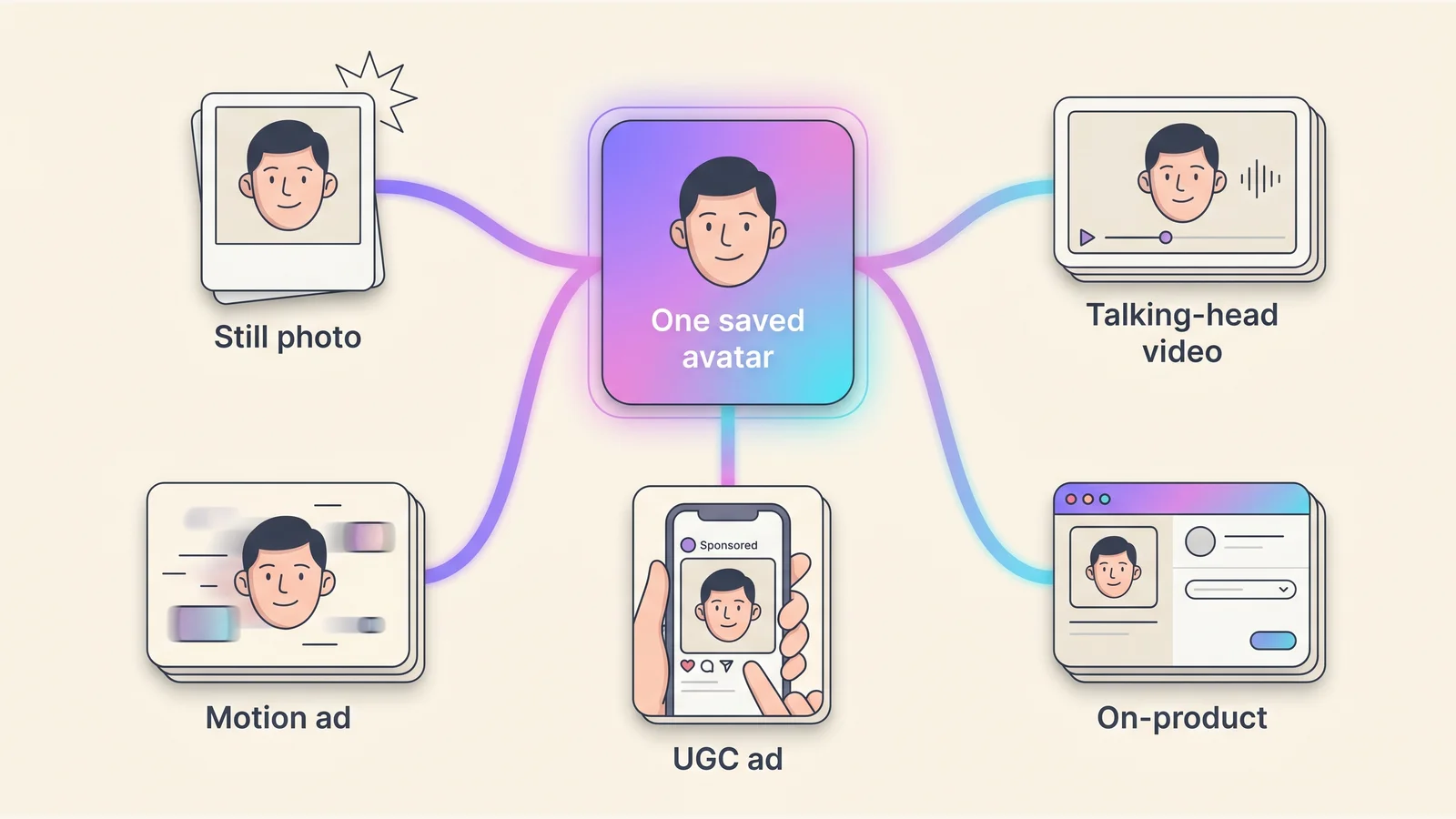
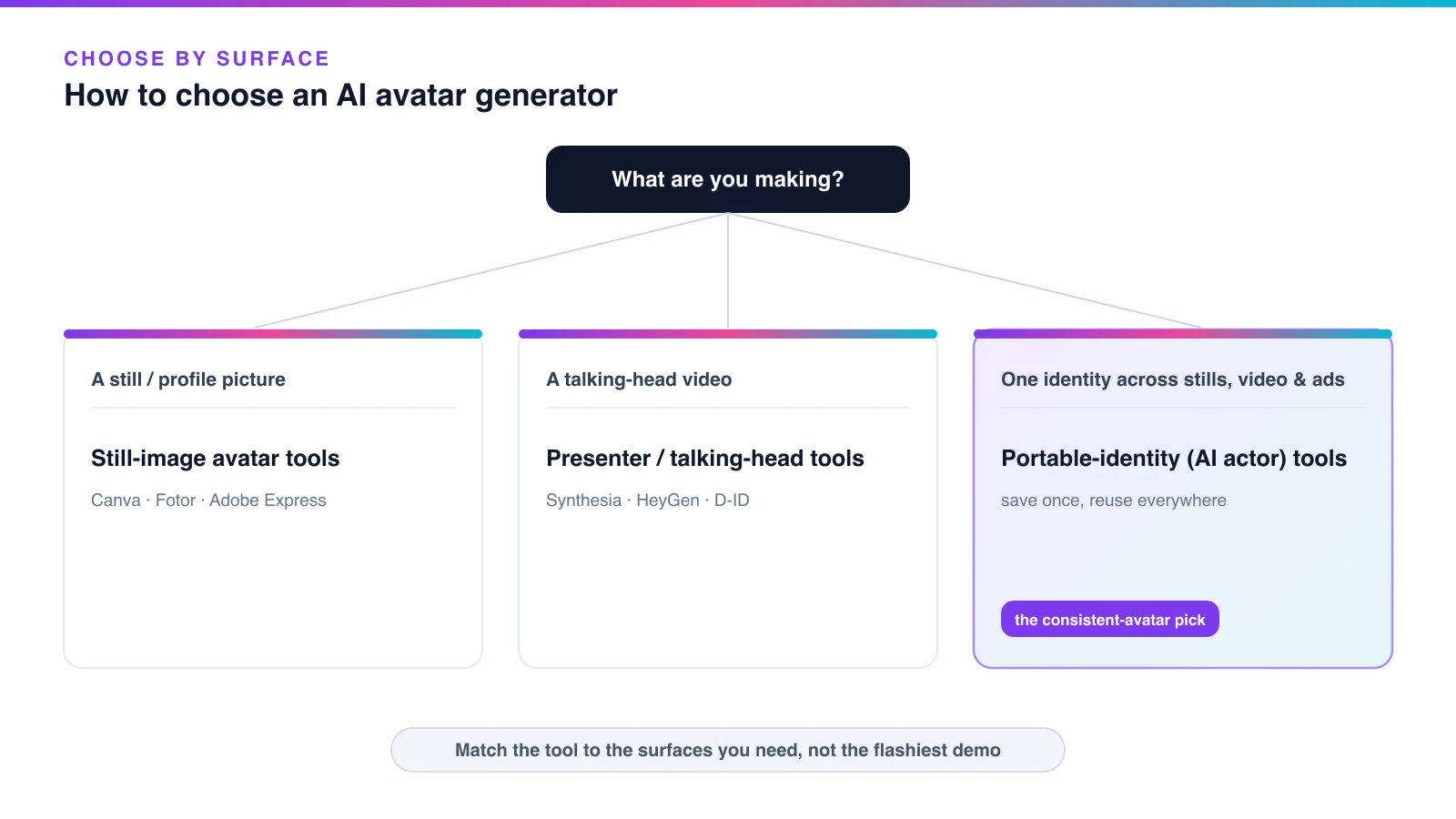
Most tools make one of three things: a still profile-picture avatar (Canva, Fotor, Adobe), a talking-head presenter video (Synthesia, HeyGen, D-ID), or one portable identity you can reuse across stills, video, and ads. The hard part isn’t making one avatar — it’s keeping the same face every time.
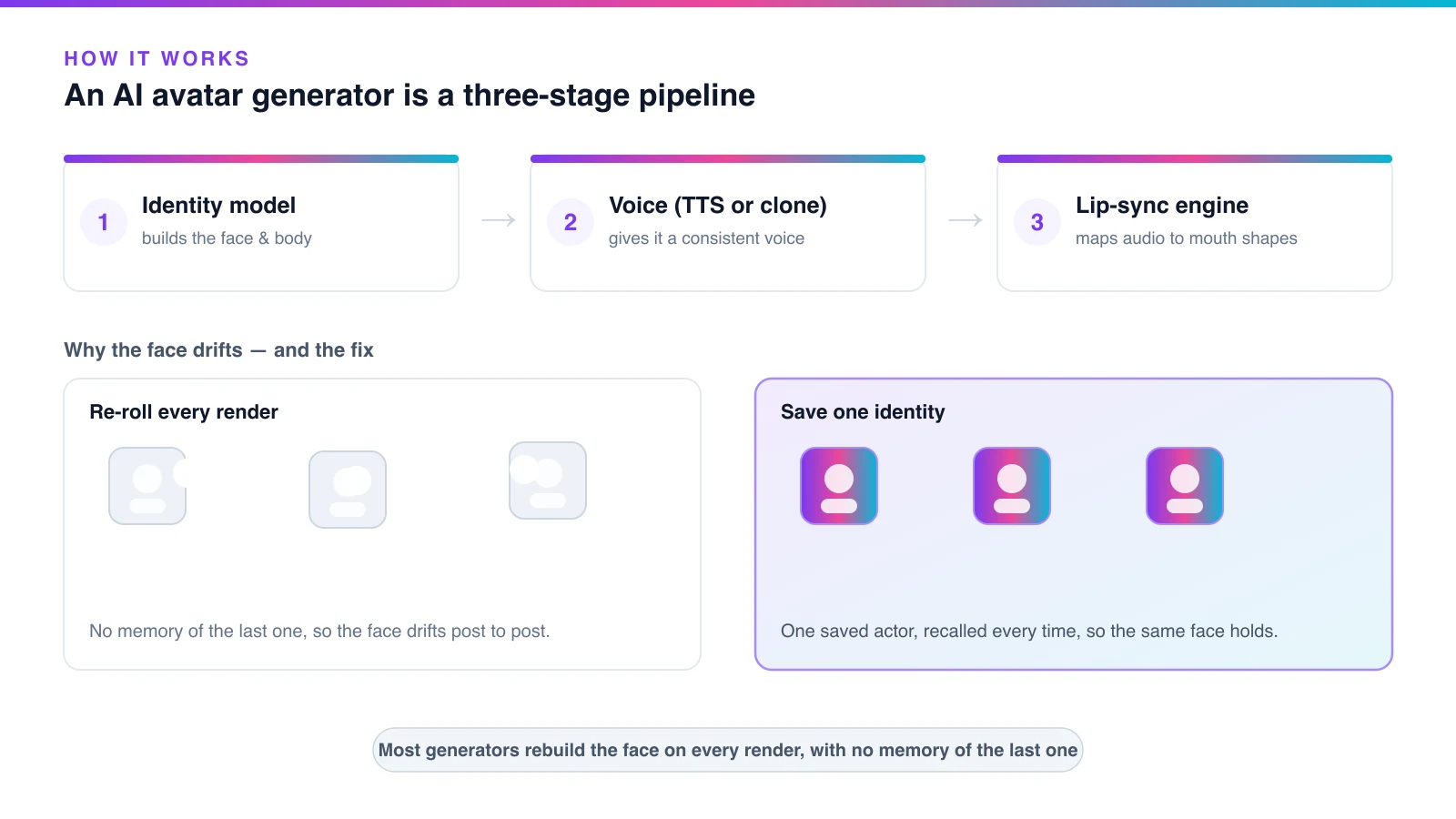
Under the hood, a generative model builds the character, a text-to-speech or cloned voice gives it sound, and a lip-sync model maps mouth shapes to the audio frame by frame. Because most generators rebuild the face from scratch on every render — with no memory of the last one — the avatar can quietly drift into a different-looking person between a photo and a video. That drift is the single thing the tool marketing pages never explain.
This guide teaches the whole picture: what an AI avatar generator actually is, how the technology works, how to choose one by what you’re making, how to keep one identity consistent across every surface (with our own measured test), what they cost, and the consent and disclosure rules — including the EU AI Act’s transparency obligations that apply from 2 August 2026.
The fix for drift is to build the avatar on one saved identity and reuse it, instead of re-rolling a new face each time.
Table of Contents
- What is an AI avatar generator?
- What can you use an AI avatar for?
- How to make an AI avatar: the 7-step method
- How to choose the right AI avatar generator
- Character consistency: why faces change (and how to fix it)
- How much do AI avatar generators cost?
- AI avatar ethics: consent, likeness, and disclosure
- Common mistakes when using an AI avatar generator
- How Playcut keeps one AI avatar consistent everywhere
- Frequently asked questions
- Conclusion: your next step
What is an AI avatar generator?
An AI avatar generator is software that builds a digital representation of a person — real or invented — and animates it to speak, express, and move on screen without a camera shoot. You supply a reference photo, a short clip, or a plain-language description, and the tool returns an avatar you can drop into images or video.
The category is large and a little blurry because “avatar” covers very different outputs. Some tools make a single stylized profile picture; others render a photoreal presenter delivering a script in 40 languages. The market reflects that breadth: estimates put the AI-avatar space somewhere around the high-single-digit billions of dollars in 2026 with 30%+ projected annual growth into the early 2030s (Precedence Research) — treat any single forecast as directional, since definitions vary widely.
What unites them is the goal: a reusable on-screen “person” that scales content without a shoot, a studio, or talent day-rates. What divides them is how many surfaces one avatar can hold its identity across — and that’s the axis that should drive your choice.
How AI avatar generators work
AI avatar generators work as a three-stage pipeline: an identity model builds the face and body, a voice model gives it sound, and a lip-sync engine maps that audio to mouth shapes frame by frame. For a still avatar you only need the first stage; for a talking-head video you need all three.
The lip-sync stage is where the craft has moved fastest. Early systems like Wav2Lip repainted a mouth onto existing footage using a GAN trained against a “lip-sync expert.” SadTalker then animated a single still photo from audio, and 2024–2025 diffusion engines pushed into full-body, gesturing avatars from one image — ByteDance’s OmniHuman-1 is the frontier example.
The trade-off is honest: GAN-based engines are fast and cheap but “struggle to maintain identity consistency,” while diffusion engines give superior fidelity at higher compute (AvatarSync). Commercial tools sit on this spectrum — Synthesia’s EXPRESS-1 and HeyGen’s Avatar IV both moved to diffusion-style audio-to-expression engines.
But every one of them shares a structural limit: each generation is a fresh sample with no memory of the last, so identity drifts. That’s the bridge to consistency, below.
AI avatar vs digital human vs AI actor vs digital double
These terms overlap, but they describe different things, and picking the wrong one wastes money. The short version: every AI actor is an AI avatar, but not every AI avatar is an AI actor. Here’s the avatar-first breakdown.
| Term | What it is | The distinguishing axis |
|---|---|---|
| AI avatar (umbrella) | A digital representation of a human — real or invented — that AI animates to speak and move without a camera shoot. | the category root |
| AI actor | A portable AI avatar: one saved identity that holds the same face, voice, and wardrobe across stills, video, UGC, and on-product shots. | cross-surface portability |
| Digital human | A higher-fidelity, often real-time conversational virtual person (support agents, kiosk hosts). | real-time interactivity vs scripted playback |
| Virtual influencer | A persona-led avatar with a social identity and audience, run by a human team. | a named persona + a following |
| Digital double | A VFX-grade replica of a specific real performer, governed by consent law (SAG-AFTRA), not a marketing tool. | replicates a specific real human under a different legal regime |
The practical takeaways: a digital human is built for live conversation; a virtual influencer is an avatar plus an audience; a digital double replicates a named real performer under SAG-AFTRA rules. For most marketing work you want the AI-actor flavor — one identity that travels. Our guide to building a consistent AI actor goes deeper on that layer; this page stays avatar-first.
What can you use an AI avatar for?
AI avatars do seven core jobs, each with a distinct buyer — and every one of them needs the same face held consistent to work as a brand asset. The strongest, best-documented results are in training, sales, and localization.
| Job | Who buys it | Why |
|---|---|---|
| Training & L&D videos | Enterprise learning teams | Update a course without re-filming a presenter |
| Personalized sales video | Sales / RevOps | One template, many named recipients |
| Marketing & explainers | Brand / content teams | On-demand spokesperson, any script |
| UGC-style ads | Performance marketers | Endorsement-style creative at volume |
| Localization | Global marketing | One avatar, dozens of languages |
| Spokesperson / brand face | Founders & SMBs | A consistent face without a talent contract |
| Social personas | Creators | A recurring on-screen character |
The vendor-reported results are striking, though treat each as a single attributed case study, not an average. Zoom reported creating training videos 90% faster and saving $1,000–$1,500 per employee per month with avatar video (Synthesia case study). ReviewThatPlace lifted proposal open rates 760% and meetings 4× with personalized avatar video (Vidyard). Trivago localized ads across 30 markets in three months, cutting post-production roughly 50% (HeyGen).
One honest distinction: these are rendered-video avatars, not real-time conversational digital humans. Playcut generates avatars for video and images — not a live support bot. The same saved identity can ship as a still, a UGC ad, a fashion AI model, a social persona, or a permanent AI spokesperson — but the through-line is always one face, reused.
How to make an AI avatar: the 7-step method
Making an AI avatar is a seven-step method: choose the type, prepare a clean reference, generate and lock one identity, add a voice, take it into video, reuse it everywhere, then confirm rights and disclose. The method below is tool-agnostic — it teaches the craft rather than one product’s buttons.
The single make-or-break step is the third one, locking one reusable identity, so that’s where the most care goes. Work the steps in order; jumping straight to “generate a face” is how DIY avatars end up looking like a different person on every surface.
Step 1: Choose the avatar type you actually need
Decide up front whether you need a still profile-picture avatar, a talking-head presenter video, or one portable identity that works across stills, video, and ads — because the type dictates the tool (Synthesia’s avatar taxonomy splits stock, custom, and customizable along similar lines).
The pitfall is buying a polished talking-head tool when you actually need one face reused across a whole campaign. Single-surface tools make a beautiful presenter that can’t follow you into a still or an ad. Pick for the surfaces you’ll ship, not the demo that looks best.
Step 2: Prepare a clean reference or a clear description
Supply one well-lit, front-facing reference photo or short clip — neutral background, no heavy filters, no sunglasses or occlusions (MimicPC) — or a plain-language description of the face, body, and wardrobe. The quality of that reference sets the ceiling for everything downstream.
The pitfall is a noisy or filtered reference: artifacts bake into every later render. If you’re starting from a single photo, that’s its own workflow — the step-by-step guide to creating an AI avatar from a photo covers it in depth — but the rule is the same: one clean, neutral, front-facing source beats five busy ones.

Step 3: Generate the avatar and lock it as a reusable identity
Generate the avatar, then save it as a reusable identity so the same face returns on every future render instead of being redrawn from scratch. This is the hard part, and the reason most DIY avatars fail.
AI image models “generate each image from scratch,” with “no ‘memory’ connecting” one generation to the next (ToonyStory). So a re-described face drifts from output to output. The durable fix isn’t a lucky seed or a longer prompt — it’s saving the look once and recalling that one identity everywhere.
If you want a tool built for exactly this, build one custom AI avatar you save once and reuse across every surface — a portable-identity AI avatar generator. The pitfall: re-rolling a fresh face per prompt, the “looks like a different person” failure.
Step 4: Give the avatar a consistent voice
Design or clone one voice and bind it to the avatar, so spoken video keeps the same tone and lip-sync across every clip. Modern voice cloning works from only a few seconds of reference audio (Expressive Neural Voice Cloning), so this step is quick once the identity is locked.
Keep the voice work light at first — this is an avatar guide, not a full UGC production. The pitfall is a new voice per video: an inconsistent voice breaks the persona as badly as a drifting face does. Lock one voice, save it to the avatar, and reuse it.
Step 5: Take the avatar into video and new scenes
Animate the saved avatar into talking-head video, motion, and new scenes — and watch for the drift that appears when a tool re-rolls the face per shot. In video, “shot boundaries reset identity” (Magic Hour), so a face that held across a few stills can slip the moment it moves.
A saved actor that spans stills and motion is what keeps a video frame matching the profile photo. The pitfall is assuming still-image consistency carries into video — motion is where identity breaks hardest, and it’s the surface most tools are weakest on.

Step 6: Reuse the same avatar across every surface
Place the one saved avatar into stills, UGC ads, and on-product shots so the identity stays the same person everywhere it appears. This cross-surface hold is the whole point of a saved identity — one face, many surfaces, no re-description.
The pitfall is rebuilding the avatar separately for each surface. That’s how a brand ends up with five faces that “feel like a sibling group, not one person.” Build once, reuse everywhere; the marginal cost of the next surface should be a render, not a re-cast.
Step 7: Confirm rights and add an AI disclosure
Confirm you own or have consent for the likeness, secure commercial rights from the platform, and label the content as AI-generated. This is required by the FTC for endorsement-style claims and, in the EU, by the AI Act’s Article 50 from 2 August 2026.
The pitfall is the most expensive one in this guide: cloning a real person’s face without written, use-specific consent (a right-of-publicity problem), or publishing an undisclosed avatar endorsement. Get consent and disclosure right and every other surface is safe to scale. Full detail in the ethics section below.
How to choose the right AI avatar generator
Choose an AI avatar generator by the surfaces you need it to cover, not by which demo looks slickest. The single best filter is “how many surfaces must one identity hold across?” — because that’s where tools diverge most and where switching later costs the most.
Below is a decision framework and a tool-category map. It is deliberately not a scored ranking of products — for that, see how the AI actor and avatar generators stack up across surfaces, or our ranked list of the best AI avatar generators for 2026. Here, the job is to match a category to your work.
The categories: still-image, talking-head, and portable-identity tools
There are three broad categories of AI avatar generator, and they map cleanly to what you’re making. Still-image tools (Canva, Fotor, Adobe Express) turn a photo into a stylized portrait — great for a profile picture, useless for video.
Talking-head presenter tools (Synthesia, HeyGen, D-ID) turn a script into a narrated video avatar in a fixed frame; Synthesia alone ships 240+ stock avatars and 140+ languages (Synthesia). They’re excellent for training and explainers, but the avatar lives inside the player and can’t walk into a custom scene or hold your product.
Portable-identity tools — the AI-actor category — save one identity you can recall into stills, motion, UGC, and on-product shots. That last category is the only one that solves cross-surface consistency, and it’s where Playcut’s AI avatar generator and AI Actors sit.
The questions to ask before you pick one
Before you commit, answer six questions. Surface coverage: does it need to be a still, a video, or both? Consistency: does the same face hold across surfaces, or only inside one clip? Custom vs stock: do you need a face you own, or is a shared library fine?
Rights: does the plan grant commercial use, and can you build from your own likeness with consent? Disclosure: can you export with AI labels for the platforms you publish on? Budget: match it to surface coverage — a sub-$30 still tool and a $30–$150/month video tool solve different problems. Answer those six and the category picks itself.

Character consistency: why AI avatars change their face (and how to fix it)
AI avatars change their face because the underlying models have no memory between generations — each render is a fresh sample, so the same prompt yields a slightly different person. This drift is the defining weakness of the category, and solving it is what separates a usable avatar from a bag of look-alikes.
It matters commercially because audiences forgive a lot, but not a face that changes between your profile photo and your ad. Fix consistency and every other surface — video, UGC, on-product — has one stable identity to attach to.
Why avatar faces drift
Faces drift for four compounding reasons. First, no memory: image models “generate each image from scratch,” with nothing connecting one render to the next (ToonyStory). Second, random noise: diffusion starts each generation from a different noise seed, so identical prompts diverge.
Third, faces are high-variance: a 5% shift in eye spacing or nose shape is immediately jarring on a face, even when it would be invisible on a landscape. Fourth, style drift: lighting, grading, and ambiguous prompts make the same character read as a different person across surfaces. Then video stacks the problem — “shot boundaries reset identity” and small errors compound across frames (iMerit).
The common DIY fixes only go so far. Seeds break the moment you change a prompt; reference images cap around 70–85% likeness; locked-character generations still drift on a meaningful share of outputs — all reported or estimated, not guaranteed.
There’s even an academic tension behind it: the harder you lock a face, the harder it is for the model to also obey a new pose, outfit, or scene (InstantID).
The fix: save one identity, reuse it everywhere
The durable fix is to build the identity once, save it as a named reusable identity, and recall that same identity into every new generation — instead of re-describing the avatar each time. This is the pattern the whole industry converged on in 2026, not a single-vendor trick.
It’s the difference between asking a model to “draw this person again” (a fresh guess) and telling it “use this saved actor” (a recall). Playcut implements it as an AI actor — face, body, and voice saved once and conditioned on for every render. The deeper AI actor guide covers the mechanism in full; the point here is that consistency is an architecture choice, not a prompt trick.
Our consistency benchmark (first-hand data)
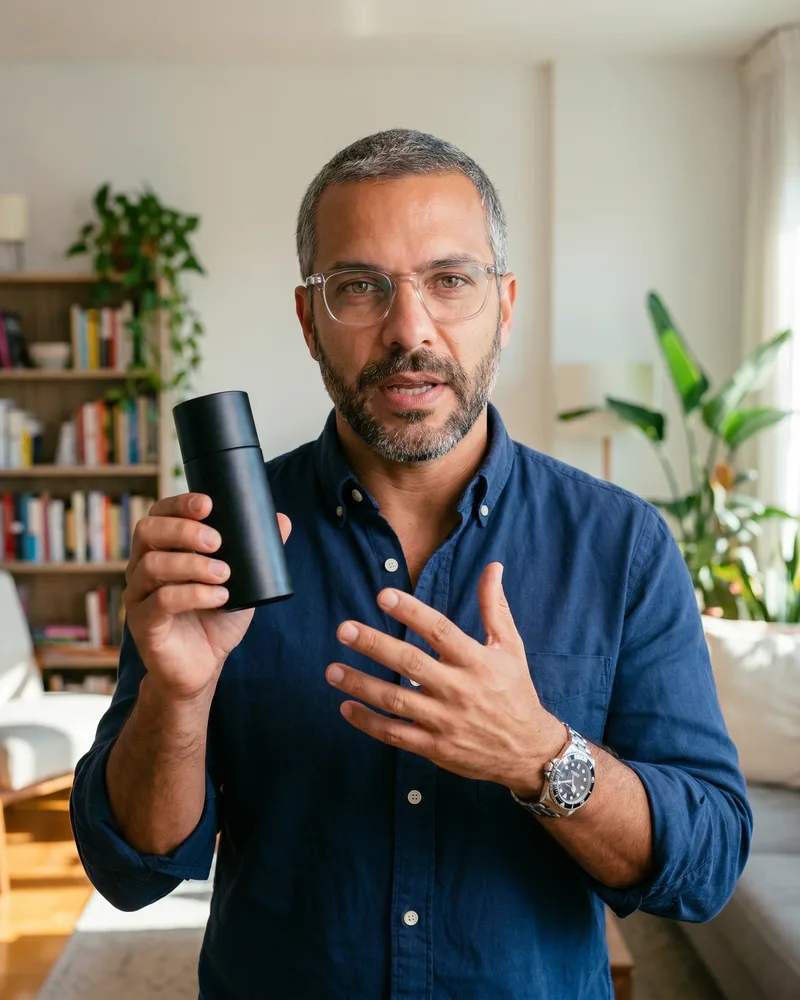
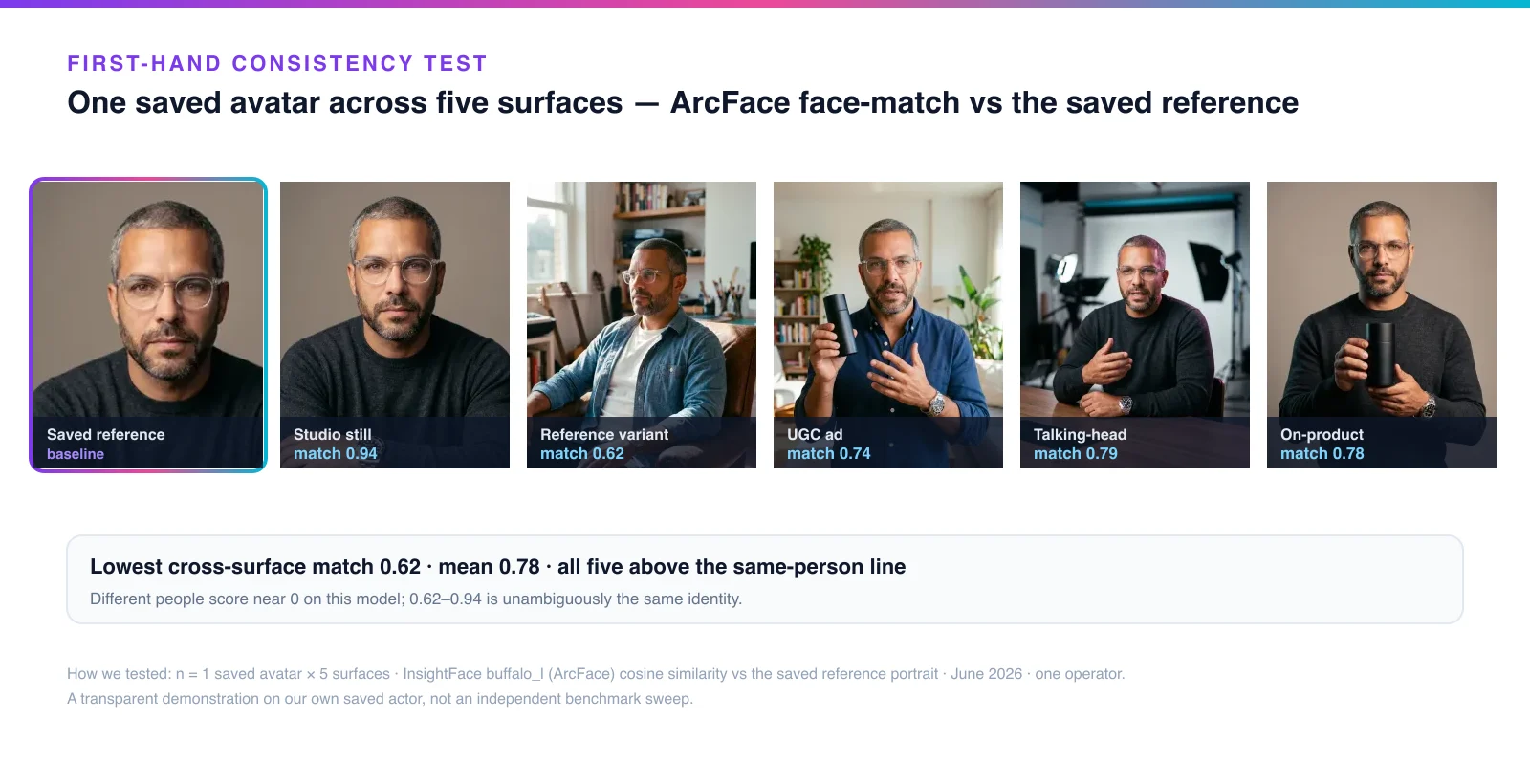
To put a number on it, we ran a small first-hand test. We took one saved avatar — the spokesperson shown throughout this article — and measured how well its face held across five different surfaces: a studio still, a reference variant in a new pose and outfit, a UGC ad frame, a talking-head video frame, and an on-product shot.
We scored each surface against the saved reference portrait using ArcFace cosine similarity (InsightFace buffalo_l), the same family of face-recognition embeddings used in identity verification. The same identity held across all five: matches ranged from 0.94 (studio still) down to 0.62 (the hardest case — a full pose and wardrobe change), with a mean of 0.78.
For context, two different people typically score well below that band, roughly 0.0–0.3 on this metric, so 0.62–0.94 is unambiguously the same person, not a look-alike. As a loose legibility anchor, HeyGen self-reports a 0.840 face-similarity score for its Avatar V (ThePlanetTools) — a different test on a different system, so treat it as a yardstick, not a head-to-head.
How we built and checked this: n = 1 saved avatar × 5 surfaces, one operator, June 2026, ArcFace cosine similarity via InsightFace buffalo_l against the saved reference portrait, with per-surface scores rounded to two decimals. This is a transparent demonstration on our own saved actor, not an independent benchmark sweep — a small sample with the obvious limitations. We publish the grid and the method so you can judge the identity hold yourself.
How much do AI avatar generators cost?
AI avatar generators run from free to five figures, and the price tracks the surfaces and ownership you need, not just the brand. A solo creator can produce a usable avatar for under $50/month; a custom enterprise presenter can cost four figures a year. The broader AI-avatar market is forecast to grow more than 30% a year into the early 2030s (MarketsandMarkets), and that competition keeps entry prices low.
The category bands below are market ranges, not a single vendor’s pricing — confirm current terms before you buy, since AI tools reprice often.
| Category | Typical 2026 price band | What you get |
|---|---|---|
| Free / watermarked tiers | $0 | A still or short demo, usually watermarked |
| Still-image avatar tools | ~$10–$30/mo | Profile-picture and portrait avatars |
| Talking-head video tools | ~$30–$150/mo | Scripted presenter video, multi-language |
| Custom studio avatar | ~$1,000+/yr add-on | A bespoke avatar trained on a real person |
| Enterprise / API | Five figures+ | Seats, security, volume, integrations |
The real decision isn’t the sticker price — it’s DIY-stack versus all-in-one. Stitching a still tool, a voice tool, and a video tool together is cheap to start but leaks consistency at every handoff. An all-in-one studio that holds one saved identity across surfaces collapses the stack and removes the drift between tools, which is usually where the hidden cost lives.
AI avatar ethics: consent, likeness, and disclosure
AI avatars are legal, but consent and disclosure are not optional — and the rules tightened sharply in 2024–2026. Two questions decide your exposure: whose likeness is this, and have you disclosed that it’s AI? Get both right and you can scale safely.
This is the section most “how to” guides skip, and it’s the one that carries real liability. Treat consent and disclosure as launch requirements, not afterthoughts.
Consent and right-of-publicity (cloning a real face)
There is no single federal right of publicity in the US — it’s a state-by-state patchwork, and the often-cited NO FAKES Act is still a bill, not law. The core rule everywhere: you cannot use a living person’s name, voice, photograph, or likeness for commercial purposes without prior consent.
Tennessee’s ELVIS Act (effective July 1, 2024) was the first US law to expressly extend right-of-publicity protection to AI voice and likeness clones (Proskauer). The safe posture is a two-axis rule: a fully synthetic avatar (no real person behind it) carries the lowest legal risk; cloning a real person requires written, use-specific consent. This is general information, not legal advice — when in doubt, get a release.
The EU AI Act and FTC disclosure rules
AI avatars are legal, but from 2 August 2026 the EU AI Act requires you to disclose AI-generated avatars that resemble real people, and Meta and TikTok already label such content automatically. The obligation splits by role: providers must mark output machine-readable (Article 50(2)); deployers — the creator or brand — must disclose a deepfake (Article 50(4)) (EU AI Act, Article 50).
A look-alike of a real person counts as a “deepfake” and must be disclosed; a wholly fictional avatar sits on the line, so the brand-safe stance is to label it regardless (Article 3 definition). Penalties for transparency breaches reach up to €15M or 3% of worldwide turnover (Article 99) — not the €35M/7% figure people often misquote.
In the US, the FTC’s Endorsement Guides expanded “endorser” to include what merely “appears to be” a person, so an avatar endorsing a product is held to the same truth-in-advertising standard, and fabricated AI testimonials are deceptive. Its 2024 fake-reviews rule carries civil penalties up to $53,088 per violation as of 2026 — up from $51,744 at the 2024 announcement (Alston & Bird).
Practically, disclosure isn’t only a law: Meta, TikTok, and LinkedIn all read C2PA Content Credentials and label AI content automatically (Meta).
Common mistakes when using an AI avatar generator
Most avatar projects fail in the same handful of ways. Avoid these and you’re ahead of the majority of DIY work:
- Re-rolling the face every render instead of saving one identity — the number-one cause of “it looks like a different person.”
- Buying for the demo, not the surfaces — a slick talking-head tool you can’t take into a still or an ad.
- A noisy reference photo — filters and occlusions bake artifacts into every output.
- A new voice per video — voice drift breaks the persona as badly as face drift.
- Assuming still consistency carries into video — motion is where identity slips hardest.
- Cloning a real face without consent — a right-of-publicity problem no tool absolves.
- Skipping disclosure — a legal and platform risk that can pull your content down.
The thread through almost all of these is consistency and rights. Save one identity, build it from a likeness you own or have consent for, disclose it, and the rest gets much easier.
How Playcut keeps one AI avatar consistent everywhere
Playcut solves the hardest problem — holding one avatar’s face across every surface — by building the avatar on a saved AI actor rather than re-generating a face each time. You create the identity once: face, body, and voice. Then every still, talking-head video, UGC ad, and on-product shot recalls that same saved identity, so it stays the same person everywhere.
That’s the architecture behind the five-surface test above: one saved avatar, measured at a 0.78 mean face-match across surfaces. Because Playcut is a multi-model studio, the same identity moves across stills, video, and ads from one workspace. When you’re ready to build one, start with Playcut’s AI avatar generator.
Frequently asked questions
What can you make with an AI avatar generator?
An AI avatar generator makes one of three things: a still profile-picture avatar (Canva, Fotor, Adobe), a talking-head presenter video that delivers a script (Synthesia, HeyGen, D-ID), or one portable identity you can reuse across stills, video, and ads. The first two cover a single surface. Only the portable-identity type — built on a saved AI actor — keeps the same face across every surface you ship.
What technology powers an AI avatar generator?
Three models work in sequence: an identity model builds the face and body, a text-to-speech or voice-cloning model gives it sound, and a lip-sync engine maps that audio to mouth shapes frame by frame. The lip-sync stage evolved from GAN mouth-repainting (Wav2Lip) to single-image animation (SadTalker) to today’s diffusion engines. Because each render is a fresh sample with no memory of the last, the same face can drift between outputs.
What is the difference between an AI avatar, a digital human, and an AI actor?
They overlap but differ by craft and use. An AI avatar is the broad term for a screen-based digital character, often a talking-head presenter. A digital human is a higher-fidelity, often real-time conversational virtual person built for lifelike interaction. An AI actor is a reusable, portable identity you can place into stills, video, ads, and product shots — the same saved face everywhere — which is what makes a consistent avatar possible across surfaces.
How do you keep an AI avatar’s face the same across photos and video?
You reuse one saved identity instead of regenerating a new face each time. AI models generate each image from scratch with no memory of the last one, so the same prompt yields a slightly different face — and it drifts worst across new scenes and into video, where shot boundaries reset the identity. The durable fix is to save the avatar once as a reusable identity and condition every new render on it, rather than re-describing it.
Why does my AI avatar look different every time I generate it?
Because the model has no memory connecting one generation to the next — a text prompt alone produces a slightly different face on every run, and even a 5% shift in eye spacing or jaw shape reads as a different person. Identity degrades fastest in long or multi-shot video, where each shot is effectively a fresh guess. This is the named “identity drift” problem, and a saved, reusable identity beats re-rolling a prompt or hunting for a stable seed.
Are AI avatars the same as deepfakes?
No. A deepfake non-consensually swaps or fabricates a real person’s likeness to deceive, whereas a legitimate AI avatar is a fully synthetic character or a consented likeness, typically disclosed. Intent, consent, and disclosure are what separate them. Under the EU AI Act, a ‘deep fake’ means AI content that resembles a real person and would falsely appear authentic, while a wholly invented avatar falls outside that definition but should still be labeled.
Are AI avatars legal, and do you have to disclose them?
Yes, AI avatars are legal, but consent and disclosure rules apply. Build avatars only from a likeness you own or have written, use-specific consent to use — cloning a real person without consent is a right-of-publicity problem (Tennessee’s ELVIS Act is the landmark example).
When an avatar makes endorsement-style claims, the FTC treats it as an endorser, and in the EU the AI Act’s Article 50 transparency rules require AI-generated content to be labeled from 2 August 2026.
How realistic are AI avatars in 2026?
Realistic enough that the gap is now use-case-dependent, not universal. Top generators render skin, hair, gestures, blinking, and eye contact convincingly, and recent research found that more realistic avatars did not descend into the uncanny valley — some scored slightly higher on trust than cartoonish versions. But realism still varies widely by tool: lower-tier outputs show stiff gestures, glossy skin, and lip-sync drift. Naturalness matters more than polish for UGC; polish matters more for corporate training.
Conclusion: your next step
An AI avatar generator is only as good as the one thing the marketing pages skip: whether it can hold the same face across every surface you ship. Choose by surface coverage, build from a likeness you own or have consent for, disclose that it’s AI, and treat consistency as an architecture choice — one saved identity, recalled everywhere, not a fresh face per prompt.
That’s the whole game, and it’s measurable: our own saved avatar held a 0.78 mean face-match across five surfaces. When you’re ready to build one, plan it with the free creator tools, or read the deeper guide to consistent AI actors for the identity layer underneath every avatar.
Build one AI avatar that holds its face everywhere.
Save one identity — face, body, and voice — and reuse it across stills, talking-head video, UGC ads, and on-product shots, with the same face on every surface. Start your free trial and build your first consistent avatar today.
Start building in Playcut →