
7 Best Opus Clip Alternatives for 2026 (Real Cost-Per-Clip Math)

If you’re hunting for an Opus Clip alternative in mid-2026, one of three numbers probably sent you here: credits that bill on the source minutes you upload rather than the clips you keep, a Virality Score with no published accuracy data behind it, or free clips that stop being exportable after three days.
This guide ranks the seven best alternatives — six clip-cutters with live pricing verified June 11, 2026, plus the one lane every other list ignores. When you have no long-form footage to mine, the Playcut Actor Engine generates native shorts with 100% character consistency — the same face and wardrobe across every video you ship. You create the footage instead of cutting it.
In a hurry?
If you have long-form footage, a cutter wins: Klap from $14/mo is the best direct Opus Clip replacement, Vizard has the best free tier, and 2short.ai is the cheapest paid entry at $9.90/mo. If you have nothing to clip, you don’t need a clipper — Playcut generates native shorts with one consistent AI actor instead of mining a back-catalog. Jump to the ranked list or the live Opus Clip pricing math.
Start your Playcut trial →
Table of Contents
- TL;DR: the best Opus Clip alternatives at a glance
- Why people look for an Opus Clip alternative
- What Opus Clip actually costs in 2026
- Repurposing vs generating: which problem do you actually have?
- How we ranked these Opus Clip alternatives
- Opus Clip alternatives compared at a glance
- The 7 best Opus Clip alternatives in 2026
- Which Opus Clip alternative fits your workflow
- Who should stay on Opus Clip
- Switching from Opus Clip: a practical 5-step guide
- Frequently Asked Questions
- Verdict
TL;DR: the best Opus Clip alternatives at a glance
The best Opus Clip alternative depends on whether you actually have footage to cut. One-line winners per use case, front-loaded:
- Best direct replacement — Klap. YouTube-link-in, clips-out simplicity. Starter from $14/mo on annual billing (10 videos, 100 clips monthly).
- Best free tier — Vizard. 60 upload minutes per month free, plus the strongest webinar/Zoom repurposing and team workspaces.
- Cheapest paid entry — 2short.ai. Lite at $9.90/mo for YouTube-first creators; unlimited watermark-free 1080p exports on Pro at $19.90/mo.
- Best all-in-one social suite — Quso.ai. Clips, captions, 1-click scheduling to 7 platforms, and analytics from $29/mo ($24 annual).
- Best caption and B-roll polish — Submagic. Trendy templates and stock B-roll, but clip-finding is a separate $19/mo add-on.
- Best when the long-form needs fixing too — Descript. A full transcript-native editor underneath the clipper. Creator $35/mo ($24 annual).
- Best when you have nothing to clip — Playcut. Generates native shorts with one consistent AI actor — a spokesperson, not a clip. From $9/mo.
- Stay on Opus Clip if you’re a high-volume clipper on Pro annual using the whole loop: ClipAnything, reframe, and the scheduler.
Why people look for an Opus Clip alternative
Opus Clip earned its market position. ClipAnything genuinely handles gaming, sports, and vlog footage that older keyword-based clippers fumbled, the clip → caption → reframe → schedule loop saves a whole tool, and the company claims 16M+ creators and businesses use it. Those strengths are real in 2026.
The complaints are real too, and four patterns drive most alternative searches.
Credits bill on the minutes you upload, not the clips you keep
This is the #1 economics complaint. Per Opus Clip’s own credits documentation, “processing clips will cost 1 credit per minute of the original video imported” — regardless of output. Upload a 60-minute podcast and Opus Clip spends 60 credits whether it finds two usable clips or fifteen.
The worked math stings. A weekly 60-minute podcast burns roughly 240 credits a month — well past Starter’s 150-credit allowance and 80% of Pro’s 300. You’re paying to process the whole episode while keeping maybe 10% of it.
Cuts that miss the point
The second recurring complaint is context-blind clipping: clips that slice off the punchline, open mid-thought, or drop the one setup sentence that makes a segment land. No AI clipper fully solves this, but it’s why creators test several before committing — keep-rates vary a lot by content type.
The Virality Score is a heuristic, not a promise
Opus Clip’s Virality Score documentation says its AI “assigns Virality Scores based on how likely each clip is to go viral,” scored 0–99 across Hook, Flow, Value, and Trend. The doc carries no accuracy metric, no methodology, and no validation data.
Third-party tests are mixed: some find high-scorers outperform on average, while many creators report low-scored clips doing better. Treat it as a sorting heuristic for which clips to review first — not a prediction.
Free clips expire in 3 days — and reviewers report worse
On the Free plan, clips stop being exportable after three days. Several third-party reviewers also report projects disappearing around three days after cancellation, even with credits remaining. Export everything before you downgrade or cancel — step one of the switch guide below.
What Opus Clip actually costs in 2026
Opus Clip costs $0 on Free, $15/month on Starter (monthly billing only), and $29/month on Pro, verified against Opus Clip’s live pricing page on June 11, 2026. Be careful with third-party “Opus Clip pricing” pages — $9.99, $15, and $19 Starter figures all circulate, plus phantom tiers, because Opus runs regional price tests.
| Plan | Price | Credits (source minutes) | Key gates |
|---|---|---|---|
| Free | $0 | 60/mo | 1080p, watermark, no editing, no ClipAnything, clips stop exporting after 3 days |
| Starter | $15/mo (monthly billing only) | 150/mo | Watermark-free, ClipAnything, Virality Score, auto-post, 30-day retention |
| Pro | $29/mo (annual discounts vary by cohort) | 300/mo | Timeline editing, AI B-Roll, all aspect ratios, scheduler, team seats |
| Business | Custom | Custom | API, unlimited seats, dedicated queue |
The mechanics that actually set your bill: 1 credit = 1 minute of source video processed. Sub-1-minute videos round up to a full credit, posting to X costs 1 extra credit per post, and monthly credits expire after 60 days — they roll over exactly one month.
Run your own number before picking a tier: a weekly hour-long show needs ~240 credits/mo (Pro territory), a biweekly one ~120 (Starter works), and Free’s 60 credits cover a single hour-long episode — watermarked, with exports dead in three days.
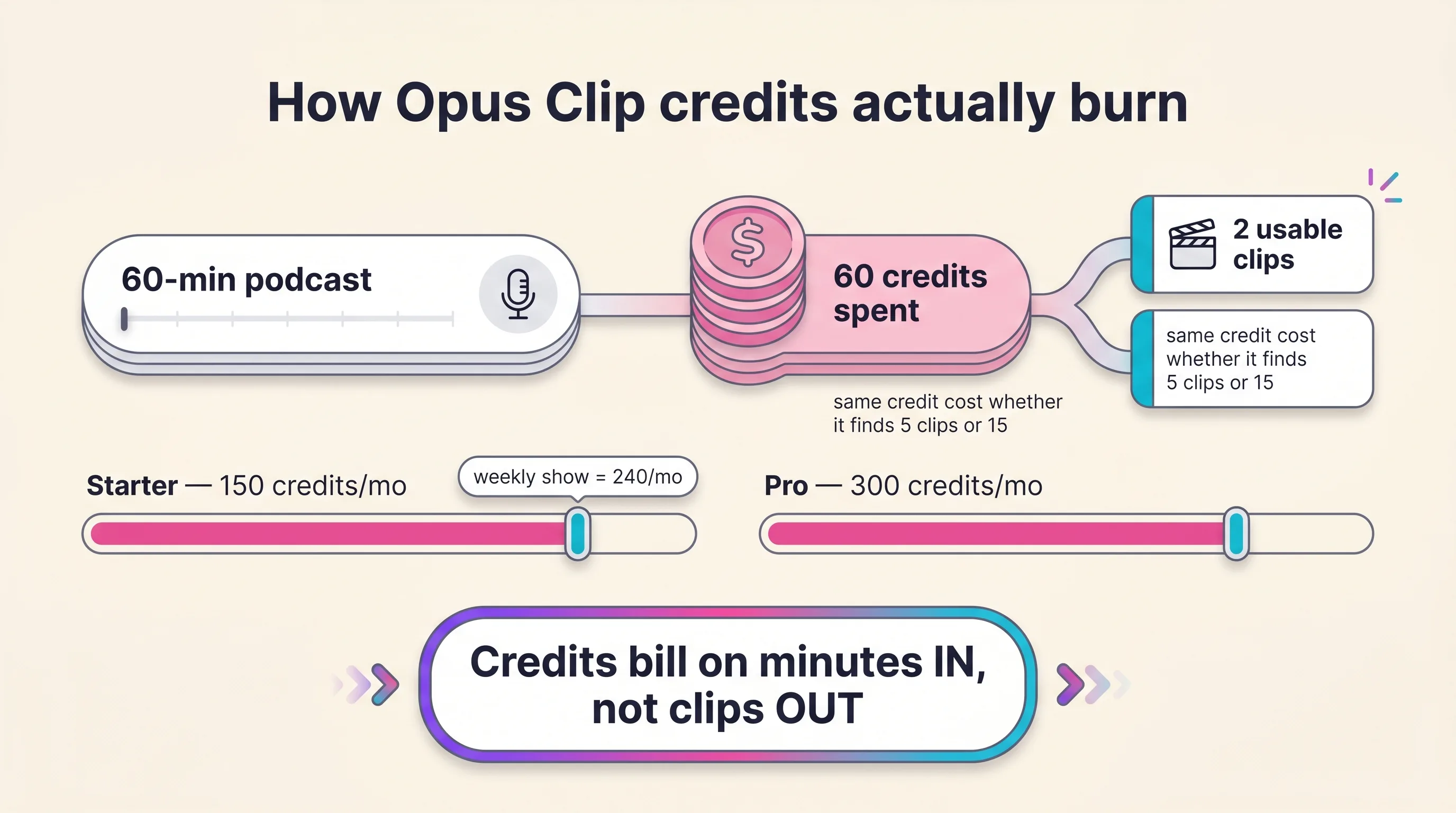
One more honesty note on the marketing. The homepage promise of “1 long video, 10 viral clips” is an illustration of typical yield, not a contract — no Opus Clip document guarantees a clip count, and credit spend is identical whether the model finds 5 clips or 15.
Repurposing vs generating: which problem do you actually have?
Repurposing tools mine long-form footage you already have; generating tools create short-form footage you don’t. Every “Opus Clip alternatives” list on the market compares cutter against cutter — but a clipper can’t help you if there’s nothing to clip.
So route by problem, not by feature list:
Lane 1 — you have long-form. Podcasts, webinars, streams, lectures. Your job is mining: clip detection, captions, reframing, scheduling. Entries 1–6 below all live in this lane, and our free content repurposing planner maps one long-form asset across every short-form surface before you pay for any of them.
Lane 2 — you need shorts but have no source footage. New brand, product launch, faceless offer, no podcast back-catalog. A cutter’s cost per clip is effectively infinite at zero source footage. This is where you generate instead: script the video, cast an AI actor, and ship native shorts with the same consistent spokesperson in every one — our AI UGC guide walks the full workflow.
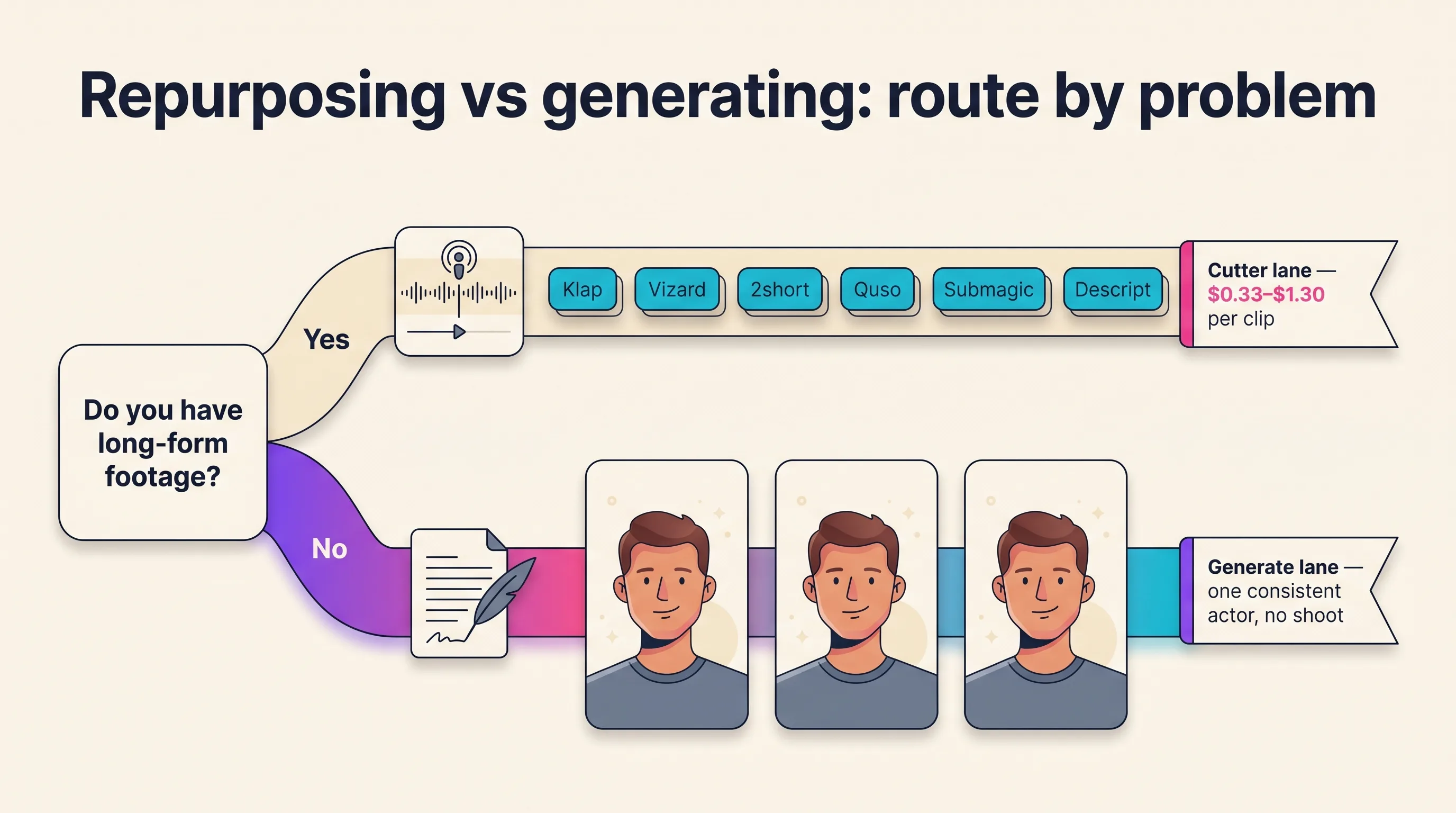
The economics of the two lanes are different by design, and we’ll state them plainly in the rankings. Repurposed clips cost cents to a dollar or two each; generated actor shorts cost more per clip because they replace the shoot itself, not the editing subscription. Neither lane is “better” — they solve different problems.
Agencies often run both motions at once: a cutter for client podcasts, a generator for client brands with no footage. That’s an honest two-tool answer, and it appears in the routing matrix below.
How we ranked these Opus Clip alternatives
Five criteria, applied to every tool, with method and date stated:
- Verified price per source minute — pulled from live vendor pricing pages on June 11, 2026. Anything we couldn’t verify directly is flagged in the entry.
- Clip accuracy on non-talking-head content — gaming, sports, and vlog footage, where keyword-based clippers historically fail.
- Watermark and export policy — what $0 actually buys, and where clean commercial output starts.
- Retention policy — whether your clips survive a downgrade or cancellation.
- Workflow completeness — captions, reframing, scheduling, and team features beyond the cut itself.
We also normalized cost per clip across tools using one stated model: 30 shipped shorts a month from ~180 source minutes (three hour-long videos), on the cheapest tier that covers the workload. That model favors the cutters — it assumes every AI pick is usable as-is, and real keep-rates are lower.
We cut several tools to keep slots distinct: CapCut (manual editing, no AI clip detection), Pictory (aging), and Riverside’s Magic Clips (a recording-suite feature, not a standalone clipper). We also excluded the vendor listicles that rank themselves #1 in this SERP — they’re competitors here, not sources.
Opus Clip alternatives compared at a glance
Character consistency sits in the top row because it’s the axis that separates the two lanes — and we mark it honestly: clip-cutters don’t have actors, because they cut footage that already exists. All prices verified June 11, 2026, except where flagged.
| Klap | Vizard | 2short.ai | Quso.ai | Submagic | Descript | Playcut | Opus Clip (baseline) | |
|---|---|---|---|---|---|---|---|---|
| Character consistency | N/A — cuts your footage | N/A — cuts your footage | N/A — cuts your footage | N/A — cuts your footage | N/A — cuts your footage | N/A — cuts your footage | One consistent actor across every generated short | N/A — cuts your footage |
| Lane | Repurpose | Repurpose | Repurpose | Repurpose | Polish + repurpose | Edit + repurpose | Generate (doesn’t cut clips) | Repurpose |
| Entry paid price | $14/mo billed yearly (~$29 monthly ⚠️) | ~$15/mo annual (unverified — JS pricing page) | $9.90/mo | $29/mo ($24 annual) | $19/mo + $19 Magic Clips add-on | $24/mo ($16 annual); full clipping at $35 | $9/mo (Hobby) | $15/mo, monthly only |
| Free tier | 1 trial video | 60 upload min/mo, 720p, watermark | 30 analyze min/mo | 75 credits, 720p, watermark | 3 videos/mo, watermark | 60 min/mo, 720p, watermark | 7-day trial | 60 credits, watermark, 3-day expiry |
| Billing unit | Uploads + clip quotas | 1 credit = 1 upload minute | Analyzing hours | Credits (rate undefined ⚠️) | Per-video quotas | Media hours | Credits — packs never expire | 1 credit = 1 source minute |
| Cost per clip (30/mo model) | ~$0.97 ($0.47 annual) | ~$0.97 ($0.48) | $0.33 | ~$0.97–$1.30 ⚠️ | $1.27 ($0.80) | $1.17 ($0.80) | ~$6.50–$16 — replaces the shoot, not the cutter | $0.97 ($0.48) |
| Standout | Cheapest serious clipper | Free tier + teams | Price floor | 7-platform scheduling suite | Caption polish | Fix the long-form too | Native shorts, zero source footage | ClipAnything + full loop |
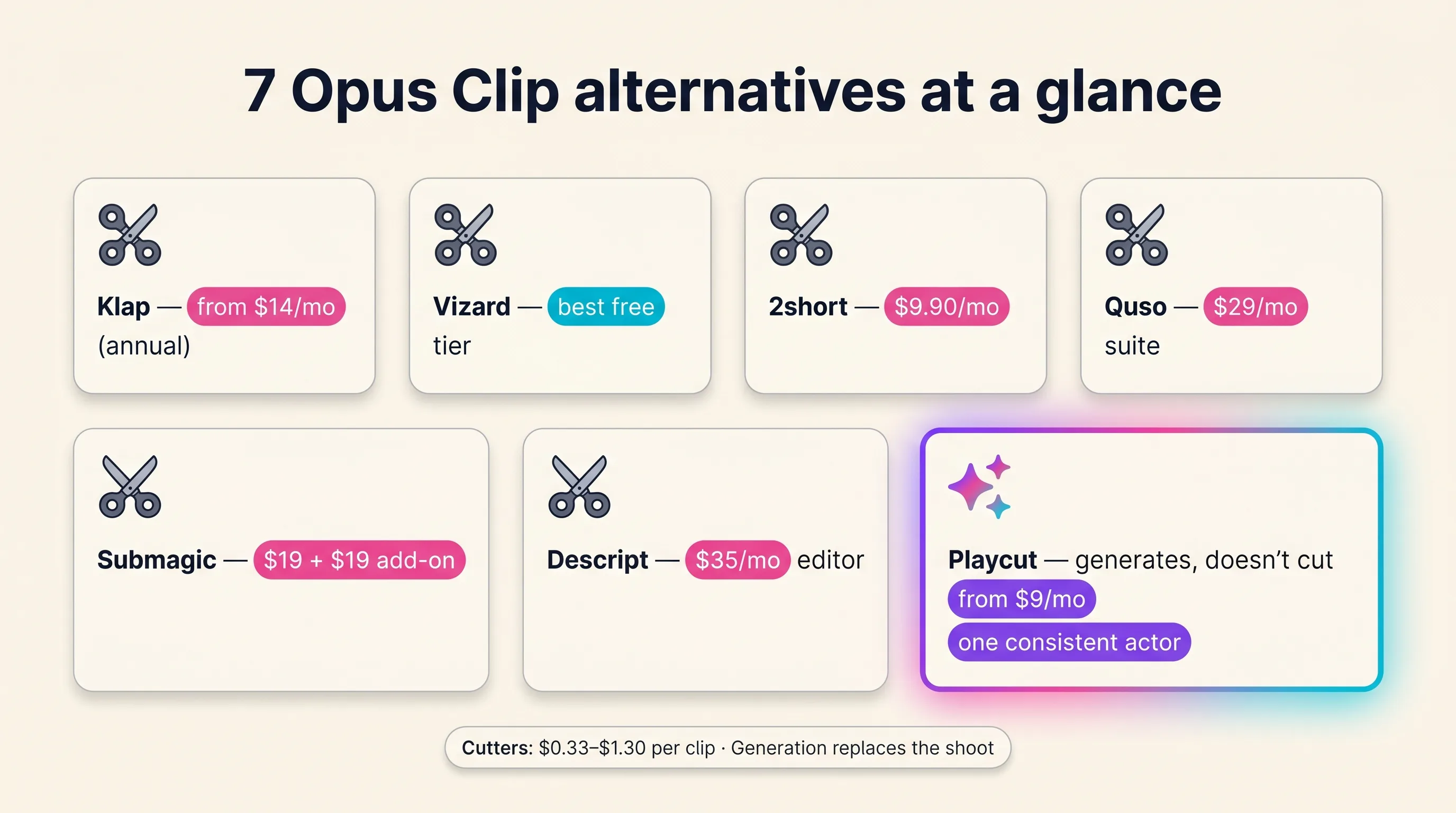
The headline from the cost-per-clip column: at entry tiers, every clip-cutter lands in a $0.33–$1.30 per shipped clip band on monthly billing. Within the cutter lane, the product differences — caption styles, dubbing, scheduling, export caps — matter more than the per-clip cost.
The 7 best Opus Clip alternatives in 2026
Each entry: what it is, where it beats Opus Clip, verified pricing, the honest limitation, and a one-line verdict.
1. Klap — best direct Opus Clip replacement
Klap is the cheapest serious per-minute clipper with the simplest workflow in the category: paste a YouTube link, get captioned vertical clips out. No suite ambitions, no add-ons — just the core Opus Clip job at a lower sticker.
Where it beats Opus Clip. Price and simplicity. Starter runs $14/mo billed yearly for 10 videos (≤45 min each), 100 clips, and 1080p; Pro is $39/mo billed yearly for 30 videos (≤2 hours), 300 clips, 4K, and AI dubbing in 29 languages, per Klap’s pricing page on June 11, 2026.
Honest limitations. Those advertised prices require an annual commitment — monthly billing runs roughly double, about $29 for Starter, implied by Klap’s own 50%-off-yearly banner and consistent with 2026 third-party reviews (the monthly toggle isn’t directly crawlable). The editor is thin next to Opus Clip’s timeline, there’s no real scheduler, and the 45-minute upload cap on Starter squeezes hour-long podcasts.
Klap vs Opus Clip in one line: Opus Clip has the deeper loop; Klap does the core job for less. Pick Klap if you want clips out of links with minimum ceremony and can commit annually.
2. Vizard — best free tier and team repurposing
Vizard has the most generous free tier in the category — 60 upload minutes a month — and the strongest business angle: webinar, Zoom, and interview repurposing with team workspaces and multi-account scheduling.
Where it beats Opus Clip. The free allowance matches Opus Clip’s 60 credits, and 1 credit = 1 upload minute keeps the math identical and predictable — though Vizard’s free tier carries its own 3-day storage window, so export promptly. Creator-tier pricing runs from about $15/mo on annual billing per Vizard’s pricing page — flagged honestly: the page renders prices in-browser only, so verify the exact figure before you buy.
Honest limitations. The pricing opacity is real, the tiered credit system takes learning, and the template register is built for business content — webinar pull-quotes more than meme-paced creator clips.
Vizard vs Opus Clip in one line: Vizard wins the $0 test and the team story; Opus Clip wins editing depth. Pick Vizard if you repurpose meetings, webinars, or interviews — or want the biggest free runway while you decide.
3. 2short.ai — cheapest paid lane for YouTube creators
2short.ai is the price floor: $9.90/mo Lite, and the cheapest verified cost per clip in our model at $0.33. It’s built YouTube-first — paste your upload, get shorts back.
Where it beats Opus Clip. Cost, twice over. Lite covers 5 hours of analyzing a month for $9.90, and Pro at $19.90 adds unlimited watermark-free 1080p exports — per 2short.ai’s pricing page, June 11, 2026. Opus Clip’s comparable workload needs Pro at $29.
Honest limitations. It’s YouTube-centric, exports cap at 1080p (no 4K), there’s no scheduler or auto-posting, and no annual discount path exists. The export-minutes cap on Lite is the squeeze if you re-export batches.
2short vs Opus Clip in one line: 2short is the budget single-job tool; Opus Clip is the workflow. Pick 2short.ai if you clip your own YouTube uploads and want the lowest possible bill.
4. Quso.ai — best all-in-one social suite
Quso.ai (formerly vidyo.ai) bundles the most workflow around the clip: AI clipping, captions, resizing, 1-click scheduling to 7 platforms, and analytics in one subscription.
Where it beats Opus Clip. Distribution. Opus Clip schedules too, but Quso’s suite goes wider — brand kits, multi-platform calendars, and a stack of adjacent AI tools. Live pricing, June 11, 2026: Lite $29/mo ($24 annual), Essential $39 ($32), Growth $49 ($40), with a free 75-credit watermarked tier.
Honest limitations. Breadth over depth — clipping quality trails the specialists. And Quso’s docs never define what one credit buys per clip, so monthly capacity is genuinely hard to forecast before you’re inside the product. We flag its cost-per-clip as a range for that reason.
Quso vs Opus Clip in one line: Quso wins post-clip distribution; Opus Clip wins the cut itself. Pick Quso.ai if scheduling and account management matter as much as clipping.
5. Submagic — best caption and B-roll polish layer
Submagic is caption-first: trendy animated templates, stock B-roll, zooms, and SFX that make a raw clip feel produced. It polishes shorts better than it finds them.
Where it beats Opus Clip. The finishing pass. If “Opus-shaped” template sameness is your complaint, Submagic’s caption craft is the draw. Starter runs $19/mo ($12 annual) for 15 videos up to 2 minutes each.
Honest limitations. The gotcha most lists miss: the actual long-form clipper, Magic Clips, is a separate add-on at $19/mo ($12 annual) on top of your plan — making the real Opus-replacement price $38/mo monthly. Per-video length caps are tight, and how the 15-video export cap interacts with “unlimited” Magic Clips output isn’t stated on the pricing page.
Submagic vs Opus Clip in one line: Submagic polishes better; Opus Clip mines better. Pick Submagic if caption quality is your differentiator and you accept the add-on math.
6. Descript — best when the long-form needs fixing too
Descript is a full editor that happens to clip. Transcript-native editing, filler-word removal, studio-sound enhancement, and eye-contact correction — then clip detection on top via its Underlord AI.
Where it beats Opus Clip. Everything upstream of the clip — Opus Clip takes your long-form as-is, while Descript fixes it first. For podcasters whose source audio needs work, that’s the whole decision. Hobbyist runs $24/mo ($16 annual) but gates clip creation to “Limited” — full Create Clips needs Creator at $35/mo ($24 annual), with 30 media hours and 4K.
Honest limitations. Clip automation is weaker than the dedicated cutters, the learning curve is real, and you’re paying for an entire editor — overkill if clips are the only job.
Descript vs Opus Clip in one line: Descript repairs and repurposes; Opus Clip just repurposes. Pick Descript if your long-form needs editing before it deserves clipping.
7. Playcut — best when you have nothing to clip
Playcut doesn’t cut clips — and that’s the point of this entry. It generates native short-form video with one custom AI actor held at 100% character consistency across every video: same face, same wardrobe, whether it’s a 9:16 UGC ad, a talking-to-camera short, or an on-product composite. The Playcut Actor Engine is the spokesperson; cutters are the scissors.
Where it beats every cutter on this list. At zero source footage, a clipper’s cost per clip is infinite — Playcut’s lane is the brand, launch, or faceless offer that needs daily shorts with no back-catalog and no camera. Script it with the free UGC ad script generator, cast the actor once, and reuse the identity forever. The Playcut Voice Engine adds 10 languages with voice cloning for localized versions of the same spokesperson.
The honest math, stated plainly. A 10-second actor short runs 85 credits on the default engine — about $1.10–$1.30 per clip at credit-pack rates — while the higher-fidelity engine at 15 seconds runs 465 credits, roughly $6–$7. No voice line item either way: the video model speaks your scripted dialogue itself. The cheap lane sits level with a $0.33–$1.30 repurposed clip; the premium lane costs several times more, and we won’t pretend otherwise.
What it replaces isn’t an Opus subscription — it’s the shoot: traditional spokesperson and product shoots run $500–$5,000 per SKU before a single edit.
Pricing (v2, current). Hobby $9/mo (500 credits) · Pro $29/mo (2,000 credits — roughly 23 ten-second actor shorts a month, or 4 at fifteen seconds on the higher-fidelity engine) · Studio $79/mo (4 seats, 6,000 credits) · Agency $149/seat (10,000 credits/seat, multi-brand kits). Annual saves 17%, and credit packs never expire — a pointed contrast with Opus Clip’s monthly source-minute pool.
Honest limitations. No long-form ingestion, no clip detection, no captions-on-your-podcast — if you have a back-catalog to mine, pick a cutter above. And cost scales with every second you render, so Playcut is a spokesperson engine, not a volume clipper: your AI actor films the hooks; a cutter slices the rest.
Playcut vs Opus Clip in one line: Opus Clip mines footage you have; Playcut creates footage you don’t — with the same consistent actor in every frame. Pick Playcut if the bottleneck is footage, not editing.

Which Opus Clip alternative fits your workflow
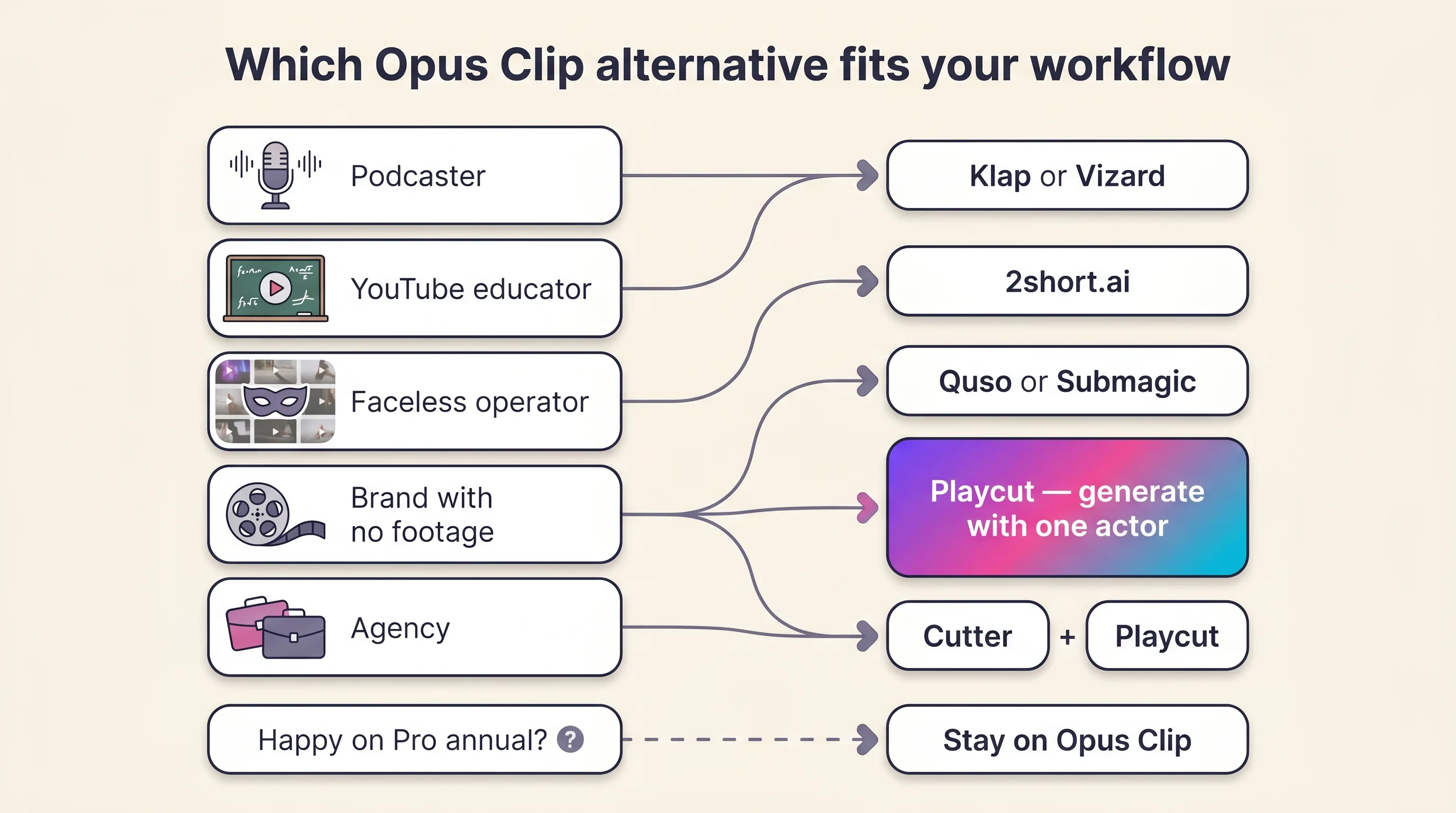
Route by what you actually have, not by feature checklists. Two branches end at “stay,” and one ends at two tools.
| Your situation | Reality | Pick | Why |
|---|---|---|---|
| Podcaster or interviewer with a back-catalog | Hours of source footage to mine | Klap (budget) or Vizard (volume/teams) | The cutters’ home turf — Playcut is not the pick here |
| YouTube educator clipping own uploads | Link-in workflow, modest volume | 2short.ai | Cheapest paid lane, $0.33/clip in our model |
| Faceless channel or theme-page operator | Mixes repurposed + original content | Quso (suite) or Submagic (polish) | Pair with the free faceless YouTube niche picker |
| Podcaster whose long-form needs fixing | Filler words, rough audio | Descript | Editor and clipper in one |
| Brand or DTC store with no source footage | Nothing to clip; needs a consistent face | Playcut | Generate instead of mine — same actor, every video |
| Agency running both motions for clients | Client podcasts AND footage-less brands | Cutter + Playcut Studio/Agency | Honest two-tool answer; workspaces and multi-brand kits carry it |
| High-volume clipper happy on Pro annual | Full loop in daily use | Stay on Opus Clip | Switching saves little if the economics already work |
Who should stay on Opus Clip
An honest alternatives list routes some readers back, and Opus Clip keeps a real constituency.
High-volume clippers using the full loop. If you’re on Pro annual, run ClipAnything across mixed genres, lean on AI Reframe’s object tracking, and schedule from inside the product, no single alternative replaces all of that at once. Switching buys migration pain, not capability.
Creators whose source-minute economics close. At ~$0.97 per clip on monthly billing ($0.48 annual) in our 30-clip model, Opus Clip sits mid-band — cheaper than Submagic’s add-on math and Descript. If your keep-rate is high and credits aren’t voiding unused, the complaint list above may simply not apply to you.
Template-ecosystem dependents. The biggest brand-template and caption-style library in the category is Opus Clip’s, by vendor claim and by usage scale. If your output identity is built on those templates, factor rebuild time into any switch.
Switching from Opus Clip: a practical 5-step guide
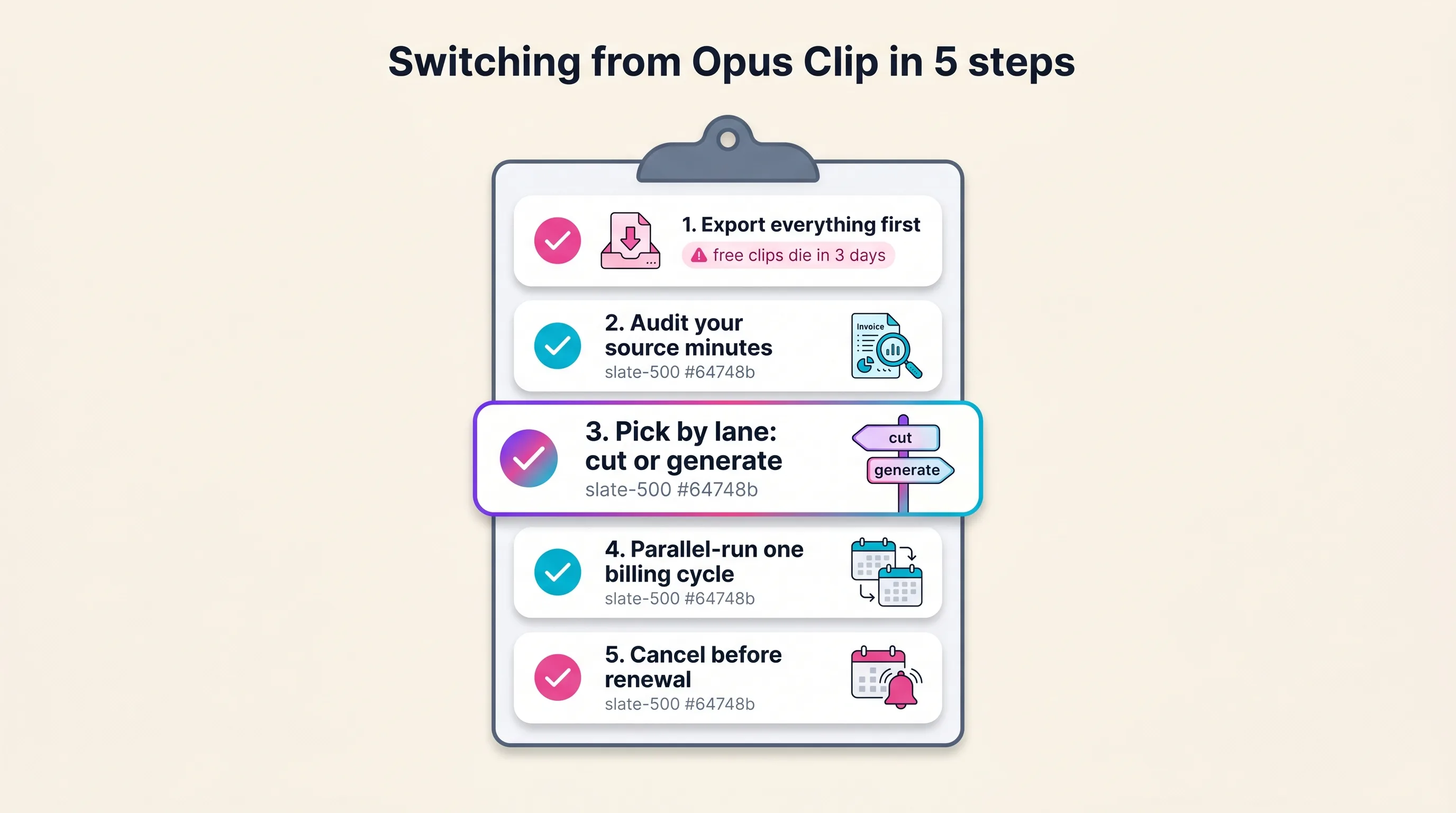
Step 1 — Export everything before touching your plan. Free-tier clips stop exporting after three days, and reviewers report projects vanishing after cancellation even with credits left. Download every clip you might need first, then change plans.
Step 2 — Audit your real source minutes. Pull three months of usage: minutes uploaded, clips kept, credits voided. Your real number — not the plan sticker — decides whether Starter, Pro, or a cheaper cutter fits.
Step 3 — Pick by lane. Long-form back-catalog → a cutter from entries 1–6. No source footage → generate with an actor instead. Both motions → run two tools and split the budget honestly.
Step 4 — Parallel-run one billing cycle. Keep Opus Clip live for one month while the replacement carries real work. Compare keep-rate, finished-clip cost, and turnaround on matched episodes — not demo content.
Step 5 — Cancel before renewal. Set a reminder several days ahead of the renewal date, confirm your exports are safe locally, and cancel inside the window rather than relying on a refund.
Frequently Asked Questions
What is the best Opus Clip alternative?
Klap is the best direct alternative for most creators — from $14/mo on annual billing for 10 videos and 100 clips monthly. Vizard wins on free allowance, Descript on editing depth. If you have no long-form footage to clip, a generator like Playcut, native shorts with one consistent AI actor, fits better than any cutter.
Is there a free Opus Clip alternative?
Yes. Vizard’s free plan processes 60 upload minutes monthly at 720p with a watermark, and 2short.ai analyzes 30 minutes monthly free. Opus Clip’s own free tier gives 60 credits, but clips stop being exportable after 3 days. For generated (not clipped) shorts, Playcut’s Hobby plan starts at $9/month.
How much does Opus Clip cost in 2026?
As of June 2026: Free ($0, 60 credits, watermarked), Starter $15/month (150 credits, monthly billing only), Pro $29/month (300 credits/month, full editing and scheduler), and custom Business pricing. One credit processes one minute of source video, so a weekly hour-long podcast needs roughly 240 credits a month.
How do Opus Clip credits work?
One credit equals one minute of source video processed, regardless of how many clips you keep. A 60-minute upload costs 60 credits even if only two clips are usable. Videos under a minute round up to one credit, and posting to X consumes an extra credit per post.
Is the Opus Clip Virality Score accurate?
Opus Clip scores clips 0–99 on Hook, Flow, Value, and Trend, but publishes no accuracy data or methodology. Independent tests are mixed — some high-scored clips outperform, while many creators report low-scored clips doing better. Treat it as a sorting heuristic, not a prediction.
What’s the difference between repurposing and generating short-form video?
Repurposing tools like Opus Clip mine existing long-form footage for clips — they need source material. Generating tools create shorts from a script with no source footage. If you have a podcast back-catalog, use a cutter; if you need daily shorts without filming, a generator like Playcut fits.
Can Playcut replace Opus Clip?
Only for one job. Playcut doesn’t cut long-form video into clips — it generates native short-form with one consistent AI actor across every video, from $9/month. If your workflow is mining podcasts or webinars, choose a cutter like Klap or Vizard. If you need shorts without source footage, Playcut replaces the need for a clipper entirely.
Opus Clip vs Klap: which is better?
Opus Clip has the deeper feature loop — ClipAnything, AI B-Roll, reframe, and a scheduler. Klap is simpler and cheaper per minute, from $14/month on annual billing with 4K on Pro plus 29-language dubbing. Pick Opus Clip for the full workflow, Klap for straightforward clips at lower cost.
Verdict
If you have long-form footage, pick a cutter — Klap for the budget lane, Vizard for teams, 2short for the price floor. If you have nothing to clip, the entire cutter category can’t help you, and Playcut’s Actor Engine — one consistent AI actor across every native short — is the lane that replaces the shoot itself. That two-lane honesty is the whole verdict: cutters win cutting, generators win creating — the jobs don’t overlap.
What no tool should make you accept in 2026: surprise billing on source minutes you didn’t audit, exports that die in three days, or a virality number with no published accuracy behind it. Run the credit math in this guide before you commit anywhere — and if you’re mapping the wider field, our Playcut alternatives breakdown and Creatify alternatives roundup cover the generate lane’s own competitors with the same live-pricing standard.
Nothing to clip? Create the footage instead.
Playcut casts one consistent AI actor — same face and wardrobe in every short — so brands with zero source footage ship native vertical video without a shoot. Your actor films the hooks; your clipper can slice the rest. Plans from $9/mo, credit packs never expire.
Cast your first AI actor →
Not ready to sign up? Try the free creator tools →